

CarderPlanet
Professional
- Messages
- 2,552
- Reaction score
- 726
- Points
- 113
There are 2 options for how to get a track. First, we do everything with pens.
The scheme is as follows: I hammered in the goods, then went into purchases (I do this from the full version of the site if I hit from the application, because in the attachment the link cannot be pulled out), if initially you hit through the site - zbs, went into purchases, then into the order, there, just above the product, there is a green line with the inscription "view order details", tyk to it, hit the order details, they didn't bother us, the main thing is to copy the link. The link will be with the words vod, itemId and trackId. You copy it, then stick your numerical values into this link (I will give below), save it. Then, when access to the battery has already been lost, you calmly enter through the VPN of the country of the akka (if you beat the UK, then from the VPN UK, respectively),
https://m.ebay.co.uk/trackShip?itemId= HERE REPLACE THE FIRST NUMBER & txnId = HERE REPLACE THE SECOND NUMBER
Method two. Track check services.
To do this, we again need to get several values.
Here's how to get them:
In order to get a track, you need two parameters, which can be taken in the "order details". Just go to the order details page and copy the link.
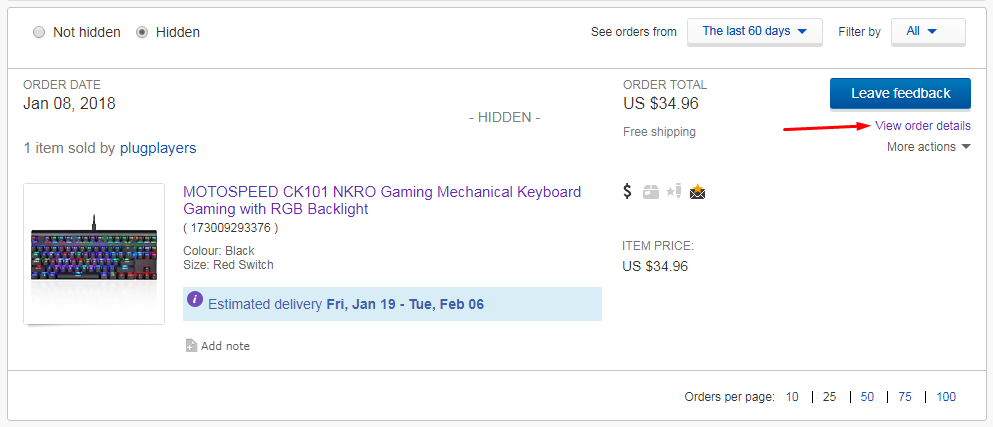

Next, we see a couple of parameters in the link - these are itemid and transid. It is in my link that the itemid is 173009293376 and the transid is 1801961736007.
Or, you can do it a little differently.
Click on the name of your product.
We are sent to the product page, where at the top on a green background there will be a link to view the order (information about the address, payment, etc.) - View order will be written in English.

A page opens where we show the product, on the right side of the address and below the payment method, so this link looks like - https://vod.ebay.com/vod/FetchOrderDetails?transId=***&itemId=***&qu=1 &gu =1&ul_noap=true
Here you can also save yourself either the entire link, or the necessary parameters to view the track in the future.
Then we insert these values into http://injtrack.info
I personally used it, but you can use any other one!
If the seller has sent the product, but has not added a track to the order, the site will not find it! If you canceled the payment for the order and the track was removed, the site will not find it! The search goes only for active orders in which the seller has added a track. if the track is not in Ebay, then there is no way to get it and no one will get it for you!
The scheme is as follows: I hammered in the goods, then went into purchases (I do this from the full version of the site if I hit from the application, because in the attachment the link cannot be pulled out), if initially you hit through the site - zbs, went into purchases, then into the order, there, just above the product, there is a green line with the inscription "view order details", tyk to it, hit the order details, they didn't bother us, the main thing is to copy the link. The link will be with the words vod, itemId and trackId. You copy it, then stick your numerical values into this link (I will give below), save it. Then, when access to the battery has already been lost, you calmly enter through the VPN of the country of the akka (if you beat the UK, then from the VPN UK, respectively),
https://m.ebay.co.uk/trackShip?itemId= HERE REPLACE THE FIRST NUMBER & txnId = HERE REPLACE THE SECOND NUMBER
Method two. Track check services.
To do this, we again need to get several values.
Here's how to get them:
In order to get a track, you need two parameters, which can be taken in the "order details". Just go to the order details page and copy the link.
Next, we see a couple of parameters in the link - these are itemid and transid. It is in my link that the itemid is 173009293376 and the transid is 1801961736007.
Or, you can do it a little differently.
Click on the name of your product.
We are sent to the product page, where at the top on a green background there will be a link to view the order (information about the address, payment, etc.) - View order will be written in English.
A page opens where we show the product, on the right side of the address and below the payment method, so this link looks like - https://vod.ebay.com/vod/FetchOrderDetails?transId=***&itemId=***&qu=1 &gu =1&ul_noap=true
Here you can also save yourself either the entire link, or the necessary parameters to view the track in the future.
Then we insert these values into http://injtrack.info
I personally used it, but you can use any other one!
If the seller has sent the product, but has not added a track to the order, the site will not find it! If you canceled the payment for the order and the track was removed, the site will not find it! The search goes only for active orders in which the seller has added a track. if the track is not in Ebay, then there is no way to get it and no one will get it for you!


