Hello.
How to Make a Telegram Account as Anonymous and Secure as Possible
Why exactly you might need this is up to you to decide. My task is to provide information. The manual will be detailed, with a description of all possible nuances. But I'll tell you right away that
all the basic settings after registering an account can be done in about five minutes. I try to describe everything in detail, so it may seem erroneous that all this is done long and tediously.
At the end of the article I will write a short summary for those who are generally knowledgeable and do not want to read tons of text.
First, let's figure out what an "anonymous and protected" Telegram account is:
• An account whose owner cannot be made anonymous (to find out his real personal data)
•
An account that you won't lose even if it turns out that you don't have access to your phone number and your phone is broken/lost
•
An account that you won't lose even if someone else gains access to your number
• An account that will under no circumstances fall into the hands of third parties
I will say right away that you can make as many accounts as you like, depending on your goals and capabilities. But each of them needs a certain setting if you want the above points to correspond.
1. Register an account
If we don't want all our friends to immediately see a notification like "Sanya Dolzhen Kosar joined Telegram", we make an account on a fake number. And preferably a foreign one, because RU numbers, according to my observations, are used more often for the second time. And it is possible that Telegram was already on it before.
The average price for one registration is from $0.5. Depends on the SMS service and the country. I remember the times when it cost $0.1 at most. But then the demand for accounts was not so high, the cart was used mainly by geeks.
The cheapest number at the time of writing this article I managed to find for $0.2, this is a Madagascar number in the
GetSMS bot (I am not recommending this bot for the first time, because I have been using it for a long time, but you can choose the service yourself, maybe it will be cheaper somewhere), below are some of the popular ones:
Web services:
smshub.org •
onlinesim.ru •
sms-activate.org •
smska.xyz •
5sim.net
Telegram bots:
WhiteSMS •
GreedySMS •
GetSMS •
CodeSMS •
MarkSMS
Before registering, uncheck the "Synchronize contacts" checkbox.
2. Basic settings
1. If we want an anonymous account, we should not use anything related to any of your other accounts on the Internet such as a first/last name, username, or avatar.
2. Go to
Settings > Privacy > Phone Number - disable display of the number for everyone
3. Settings > Privacy > Last Activity - disable displaying the time of the last online. Others will see
"was recently" , and you will see others too.
When you are online, only the person you are currently communicating with will see your online status. The status will be shown to this person within a few seconds - when you write a message or when you open their new message.
Also, your online status will be visible to anyone who is in the same group chat with you,
but only when you write something in this chat. Moreover, a person does not necessarily have to watch this chat. It is enough to simply be in it and see your account in their list of dialogues. Keep this in mind.
4. Settings > Privacy > Calls - I usually disable calls for everyone, because if you hang out in a lot of big communities, there will definitely be some idiot who suddenly wants to call for some reason

As for
Peer-To-Peer calls, we definitely disable them, because P2P calls (directly from client to client, not through the Telegram server) reveal your IP. If you need to make a call with a stranger, you should definitely do it through the Telegram server.
3. Important security settings
1. Settings > Privacy > Code-Password - this is a local four-digit PIN code for your current device. It is needed so that even if someone gets their hands on your unlocked phone (to show photos to a friend, let them surf the Internet, etc.), you can first lock the cart from prying eyes.
2. Settings > Privacy > Two-factor authentication - 2FA (two-factor/two-step) is one of
the MOST important settings. It will not allow you to log into your Telegram account by simply receiving a code from an SMS. And since numbers often go around the second time, there is such a possibility and in my memory this has happened more than once. If the number does not belong to you personally, sooner or later it can be used by someone else.
Come up with a good, non-trivial password that you can remember. Don't use 2FA passwords that you have in other services.
Accordingly,
even if someone gains access to the number and enters the SMS code correctly, they will not be able to log into the account because they do not know your 2FA password.
Next, the telegram will offer you to add mail, skip it for now. And move on to the most interesting part.
4. Protecting your account from loss (part 1)
By setting up a 2FA password, we protect your account from unauthorized access. But
this does NOT protect the account from being destroyed. If someone gains access to the number, they will not be able to log in, but they will be able to reset the current account to create a new one.
Reset = deletion.
How to avoid this?
Be sure to add an email. And it's enough to simply link it once (if you lose access to it later, it's not a big deal).
Since you may need a lot of Telegram accounts, you need a simple way to instantly create an email. There is such a way - the
WWPager bot. This is an email service right inside Telegram. There's a ton of functionality there, but we just need the basics — creating a new mailbox in a second and receiving an email from Telegram. In principle, you can use any other email you like. Even a temporary disposable email. The fact of linking is important here.
1. Go to
WWPager and click
/start, copy our email address
2. Go to
Settings > Privacy > Two-step authentication (enter password)
> Specify email. An email with a code comes to our bot. You can see the code simply in the notification at the top, no need to exit the current screen.
What's interesting is that Telegram emphasizes that email is needed to restore a forgotten 2FA password. But for some reason, it doesn't indicate that without it, your account can be deleted, having only access to your phone number, although this is exactly the case.
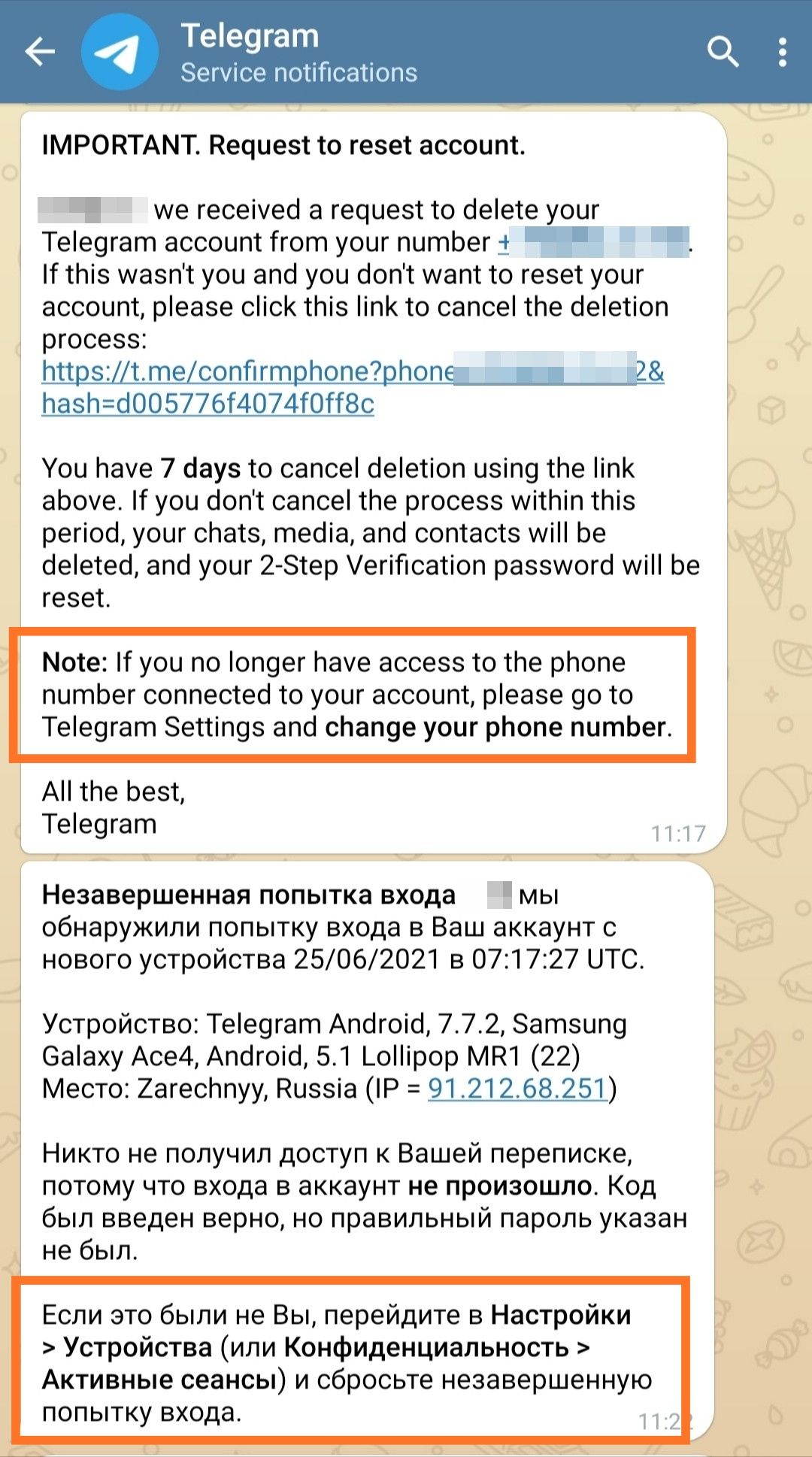
Now let's talk about how it works in more detail. Telegram is designed so that if your email is linked, then when you try to reset your account, you will receive a letter saying that someone is trying to delete your account and you will have 7 days to prevent this. Telegram duplicates the same message in the account itself as a service notification. That is why it is not critical to maintain access to the email itself.
Here's an example of how last year someone from Zarechny tried to delete one of my profiles. The account was on a .ru number, which a year later was either reissued by the operator and sold to someone (SIM card), or went around the second circle in SMS services. I managed to simply relink the number and save the account without any problems.
You will have two options: either confirm ownership of the number using the code from the SMS and cancel the attempt to reset the account. Or
simply change the linked phone number within seven days. This is what we need to do using the same SMS services
5. Protecting your account from loss (part 2)
You can also lose your account by simply losing access to it (your phone broke, you accidentally deleted the app, you lost your phone, etc.) and without access to the number it will be impossible to get it back. But this may also be foreshadowed. We make a backup of the account using Telegram Desktop Portable:
1. Go to
the official Telegram website (open from your computer) and download the portable version for Windows. The portable version does not tie the application to one device, you can simply take it with you on a flash drive, or upload it to the cloud and then open it on any other PC.
2. Extract the program from the archive. If you have many accounts, you can simply copy several folders with the program and sign each one so that it is convenient for you to distinguish between accounts.
3. Log in using a QR code (on your phone:
Settings > Devices > Connect device ) and set auto-completion of sessions to 1 year
4. Next, you can archive the folder where you have the portable versions with your accounts using Winrar with a password and upload it to the cloud or save it somewhere else (in case something happens to your PC).
Now, if access to your phone is lost, you can always restore it using the desktop version. When authorizing, the code will come not in an SMS, but in Telegram Desktop.
5. Make a reminder in your calendar that you will need to go into these backups once a year to update the session. Otherwise, the sessions in them will be reset after a year, as indicated above in the screenshot.
6. You can also temporarily duplicate authorization on another phone, for example, if you don't have a PC at hand. The most convenient way to do this is in third-party Telegram clients, where you can add multiple accounts to one client. Third-party clients that are available in Google Play and the App Store are safe. They are open source and are developed based on the official Telegram API.
Popular clients:
Android:
Plus Messenger,
BGram,
iMe
iOS:
iMe,
Nicegram
6. Safety in use
I will describe some points that are worth considering in order not to lose anonymity.
1. Be careful which links you follow. There are a number of tricks that allow you to disguise a link to a regular site (like YouTube) in IP-logger (a link that, when followed, will result in your IP and some information about the device being given to the attacker) .
The screenshot above shows two links sent via Telegram. Both links seem to be the official mobile YouTube domain
youtu.be, but the first link is an IP logger masquerading as YouTube, and the second link is the real video. The difference is that the real domain is always on the right before the slash. In the first case, after
youtu.be there is a dot, followed by
2no.co (the IP logger's domain).
The actual domain is always on the right, before the slash (if there is a slash). There is never a dot after the actual domain. There can only be a slash after it or nothing.
2. Not all bots are equally useful.
Some bots require you to share your phone number to continue using them. Sometimes these are bots that specifically collect information for services like "Eye of God". If you don't know why the bot requires you to share your number, it's better not to use that bot.
3. Open chats. There are bots that show information about which open groups the user is a member of. If you want to remain anonymous, but are a member of the group "Lovers of Saransk cats" - the
TeleSINT bot can tell the interested person about this
4. Your
screenshots . If you leave screenshots from your device somewhere (in chats, in private messages), then they may also contain certain information. This includes the time in the status bar, which can be used to determine the time zone. The icons in the status bar can be used to determine the brand of the phone, etc. Of course, all this is very indirect data. But if someone is digging under you, they can compare this information with other information already found and get a more detailed picture.
There may be an infinite number of nuances. Including even a person's unique "handwriting" on the Internet. How a person communicates, what words and expressions he uses. For example, many people who know me personally could easily identify me by the style of this text. And the authorities use special neural networks for such tasks, which analyze a person's "network handwriting" and try to find matches.
The main and most important points, I think, are listed. I hope this information will make you pay more attention to the security and anonymity of your Telegram accounts. If, of course, you have such goals. But in our time, especially living in the Russian Federation, I recommend setting such goals for yourself. Because today you will write somewhere "no to war", and tomorrow they will come for you to accuse you of extremism and other mortal sins
I may add to the article if I remember anything else. So save the post and share with your friends. All the best

A summary of the main account settings (for fans of Sister Talent):
- Registration on a fake number. Better foreign
- We hide the number and status from everyone
- We disable P2P calls so as not to expose our IP in case of a call
- Local pin
- 2FA is mandatory with email binding so that your account cannot be deleted by someone who gains access to the number
- We backup accounts using Telegram Desktop Portable, store backups in archives under a password in a safe place (for example, a personal cloud)