Credit Card Reader NFC (EMV)
This app was made to read public data on an NFC banking card compliant with EMV norm.
Infos: This application is an analysis tool for
reading contactless NFC EMV credit cards data. In some new EMV card, holder name and the transaction history have been removed by issuer to protect privacy. Be sure your card is NFC compliant (NFC logo printed on them).This app is not a payment app. Send me your card log and an email if you find an issue with this app.
Security:
• In-App purchases are only present for donation.
• This app doesn't access to Internet (No Internet permission).
• Sources available on Github
https://github.com/devnied/EMV-NFC-Paycard-Enrollment
Compatible EMV cards:
• Visa• American Express
• MasterCard
• LINK (UK) ATM network
• CB (France)
• JCB
• Dankort (Denmark)
• CoGeBan (Italy)
• Banrisul (Brazil)
• Saudi Payments Network (Saudi Arabia)
• Interac (Canada)
• Discover Card
• UnionPay
For security reason, this app doesn't access to Internet (No Internet permission) and you must confirm that you own the credit card before access to the application.
By default, credit card number is masked.
How to play Credit Card Reader NFC (EMV) on PC
Download and Install Nox App Player Android Emulator.
Run Nox App Player Android Emulator and login Google Play Store.
Open Google Play Store and search Credit Card Reader NFC (EMV) Download.
Install Credit Card Reader NFC (EMV) and start it.
Well done! Now you can play Credit Card Reader NFC (EMV) on PC, just like Credit Card Reader NFC (EMV) for PC version.
Android CardReader Sample
This sample demonstrates how to implement a low-level NFC card reader, for reading cards that do not contain NDEF or Android Beam data. This sample is designed to read the virtual loyalty card implemented in the "CardEmulation" sample.
In particular, this sample demonstrates how to disable Android Beam, select which AIDs the reader is interested, and establish communication with the card.
Pre-requisites
- Android SDK v23
- Android Build Tools v23.0.0
- Android Support Repository
Getting Started
This sample uses the Gradle build system. To build this project, use the "gradlew build" command or use "Import Project" in Android Studio.
Support
If you've found an error in this sample, please file an issue:
https://github.com/googlesamples/android-CardReader
Patches are encouraged, and may be submitted by forking this project and submitting a pull request through GitHub. Please see CONTRIBUTING.md for more details.
Virtual Smart Card Architecture
Virtual Smart Card Architecture is an umbrella project for various projects concerned with the emulation of different types of smart card readers or smart cards themselves.
Currently the following projects are part of Virtual Smart Card Architecture:
Please refer to
project's website for more information.
NFC Smart Cardreader
NFC Smart Card Reader PC/SC Library.
Example code and library for raw communication to NFC tags with Windows Phone 8.1, but requires a device with support (Lumia 830 & 73x)
Project Description
Example code and library for raw communication to NFC tags with Windows Phone 8.1, but requires a device with support (Lumia 830 & 73x)
NOTE: This code will work only on a Windows Phone running 8.1 or higher, and with an NFC driver that supports smart card reader mode such as the NXP PN547 which is available on the Lumia 730 and Lumia 830 (it will NOT work on a Lumia 930 or any existing hardware, even after updating to 8.1). See inside the MainPage.GetDevices() function for how to detect at runtime whether a device supports this functionality.
A new feature in Windows Phone 8.1 (on specific new hardware devices) is to be able to directly send raw commands to external plastic NFC cards, previously the phone could only read/write NDEF messages to NDEF-formatted tags but now you can talk to things like transit passes etc. For NXP PN547-based devices NFC cards such as MIFARE Classic/Ultralight/DESfire, ISO7816-4/APDU-based cards like JCOP, Jewel are supported as well as some limited support for ISO15693 and Felica. This project contains sample code only for MIFARE Classic/Ultralight/DESfire and Felica, but can be easily extended to support the others.
The Windows.Devices.SmartCards.SmartCardReader WinRT API lets you send raw APDU commands and get responses (similar to the WinSCard Win32 APIs on desktop), but for cards that are not APDU-based (eg MIFARE Classic/Ultralight, Felica, Jewel, ISO15693 etc) we follow the PC/SC standards whereby you construct an APDU containing the data needed for the command you want and the NFC driver will convert that to the appropriate native command and send to the card. Also, in order to identify the type of non-ISO7816-4/APDU card present the ATR (answer to reset) returned by the SmartCard object is encoded according to the PC/SC specifications. The PcscSdk project source code contains libraries that will encode/decode the PC/SC-based APDUs/ATRs necessary to talk to these contactless NFC plastic cards, and there is a sample phone app that demonstrates the usage.
For details on the PC/SC APDU encoding of commands to non-APDU-based contactless cards please refer to section 3.1.3 in the PC/SC specification here:
http://www.pcscworkgroup.com/specifications/files/pcsc3_v2.01.09.pdf as well as the supplemental documents here:
http://www.pcscworkgroup.com/specifications/files/pcsc3_v2.01.09_sup.pdf and here:
http://www.pcscworkgroup.com/specifications/files/pcsc3_v2.01.09_amd1.pdf
The following is a partial list of commands which are supported by the NXP PN547 driver but this sample code has not yet implemented, please do contribute back to the project if you implement them
ISO15693 Family
| Command | CLA | INS | P1 | P2 | Le |
|---|
| WRITE | 0xFF | 0xD6 | Block Number | 0x00 | 0x4 |
Jewel Family
| Command | CLA | INS | P1 | P2 | Le |
|---|
| WRITE1-E | 0xFF | 0xD6 | Block Number | Block Offset | 0x01 |
| WRITE8-E | 0xFF | 0xD6 | Block Number | 0x00 | 0x08 |
Jewel Family
| Command | CLA | INS | P1 | P2 | Le |
|---|
| READ ALL | 0xFF | 0xB0 | 0x00 | 0x00 | 0x00 |
| RID | 0xFF | 0xB0 | 0x00 | 0x00 | 0x06 |
| READ | 0xFF | 0xB0 | Block No | Block Offset | 0x01 |
| READ 8 | 0xFF | 0xB0 | Block No | 0x00 | 0x08 |
| READ SEG | 0xFF | 0xB0 | 0x00 | Segment Addr | 0x80 |
MIFARE Standard increment/decrement etc, see section 3.2.2.1.10 in
http://www.pcscworkgroup.com/specifications/files/pcsc3_v2.01.09_amd1.pdf
Info:
https://archive.codeplex.com/?p=nfcsmartcardreader
Download archive
https://codeplexarchive.blob.core.w...cts/nfcsmartcardreader/nfcsmartcardreader.zip
pyscard - Python for smart cards
pyscard - Python smart card library - is a Python module adding smart cards support to
Python.
Download
The pyscard project is available from different sources:
Patch/bug reports
Report bugs or issues on
github issues or
sourceforge.
Report patches as
github pull requests or on
sourceforge feature requests system.
Architecture
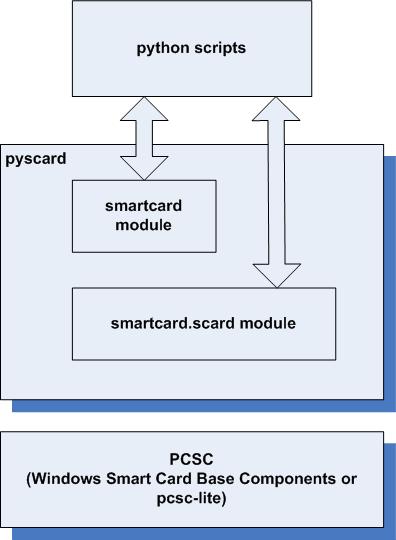
Pyscard consists of:
- smartcard.scard, an extension module wrapping the WinSCard API (smart card base components) also known as PC/SC, and
- smartcard, a higher level Python framework built on top of the raw PC/SC API.
Documentation
pyscard user’s guide
smartcard reference (Python smart card library)
scard reference (Python PCSC wrapper), the Python wrapper around PCSC
Samples
High level API samples: See
pyscard smartcard framework samples
Low level API samples: See
PCSC wrapper samples
Index contents:
- pyscard user’s guide
- Copyright
- Introduction
- Smart Cards
- Quick-start
- The reader-centric approach
- The Answer To Reset (ATR)
- The card-centric approach
- Requesting a card by ATR
- Requesting any card
- Custom CardTypes
- Selecting the card communication protocol
- The object-centric approach
- Tracing APDUs
- The brute force
- Using card connection observers to trace apdu transmission
- Testing for APDU transmission errors
- The brute force for testing APDU transmission errors
- Checking APDU transmission errors with error checkers
- Error checkers
- Error checking chains
- Filtering exceptions
- Full sample code
- Detecting response APDU errors for a card connection
- Writing a custom error checker
- Smartcard readers
- Listing Smartcard Readers
- Organizing Smartcard Readers into reader groups
- Monitoring readers
- Smart Cards
- Monitoring Smart Cards
- Sending APDUs to a Smart Card Obtained from Card Monitoring
- Connections
- Creating a Connection from a CardRequest
- Creating Connection from CardMonitoring
- Card Connection Decorators
- Exclusive Card Connection Decorator
- Exclusive Transmit Card Connection Decorator
- Secure Channel Card Connection Decorator
- A word on cryptography
- Binary strings and list of bytes
- Secret key cryptography
- pyscard smartcard framework samples
- Display the ATR of inserted cards
- Selecting the DF_TELECOM of a card
- A simple apdu tracer and interpreter
- Tracing connection events
- Decorating Card Connections to add custom behavior
- Detecting response apdu errors
- Implementing a custom ErrorChecker
- Implementing a custom card type
- Monitoring smartcard readers
- Monitoring smartcard insertion/removal
- APDU/ATR byte to string utilities
- PCSC wrapper samples
- send a Control Code to a card or reader
- get the ATR of a card
- get the attributes of a card
- wait for card insertion/removal
- list the cards introduced in the system
- list the interfaces supported by a card
- locate cards in the system
- manage readers and reader groups
- list smart card readers
- select the DF_TELECOM of a SIM card
- perform a simple smart card transaction
- License
.NET Library for Smart Chip Cards
Smart Card API for .NET – a few lines of C# or VB.NET code is all it takes to access smart chip cards. Our class library and helper classes come with C# and VB.NET sample code. Easy-to-use managed code supports contact and contactless chip cards on PCSC compatible smart chip card readers and chip encoders built into plastic card printers.
Fast Integration
SmartCard API class library supports .NET programming languages such as
Visual Basic.NET,
Visual C#.
It exposes native, Windows smart card API (winscard.dll) through a set of managed, event-driven .NET classes.
- card and reader tracking via events
- managed PC/SC wrapper class
- saves time and money
Free Trial SDK
Download your trial version now:
- fully functional SDK
- sample applications and extensive documentation.
Simple Licensing
Purchase of a software license grants
Royalty Free usage and redistribution of runtime files with your software.
C# Source Code
Protect your investment: The complete
C# source code for our core library smartcard.dll is available for purchase, too.
Storage Cards
Contact and contactless memory cards is supported.
Contactless: Mifare Classic, Ultralight, DESFire EV1, iCODE, …
Contact: SLE 4442, AT24SCxx
Prox: HID Prox
Support for legacy HID iCLASS cards and iCLASS SEOS cards upon request.
Government Cards
Get started Government issued cards via both contact (ISO 7816) and contactless (ISO 14443, ISO 15693) interfaces using PC/SC-based industry standards compliant readers.
- U.S. Gov. PIV card
- U.S. Gov. CAC
Third-party APIs
There is a tendency away from proprietary, native APIs. We therefore integrate readers and cards on APDUs level whenever possible.
Limited support available for Identive’s MCARD API. Full support available for OMNIKEY SCARDSYN and German CT-API.
Maintenance and Support by CardWerk Technologies
We offer maintenance contracts, on site training and professional consulting services including smart card development services for iCLASS, DESFire EV1, SEOS, PIV card, Mifare, JavaCard, MULTOS and countless more chip card types. We can assist with any smart card you need.
Download SmartCardAPI for .NET
Links:
Smartcard reader
Here are 20 public repositories matching this topic
frankmorgner / vsmartcard
umbrella project for emulation of smart card readers or smart cards
C.
martinpaljak / apdu4j
Java code for APDU level smart cards: javax.smartcardio, PC/SC and remote JSON.
Java.
Nitrokey / nitrokey-storage-firmware
Firmware for the Nitrokey Storage device.
C.
grakic / jfreesteel
A native Java library, a Swing GUI application and an applet to read the Serbian eID card, built on javax.smartcardio
Java.
kogoia / MRTD.NET
C#
Archie-Yang / PcscDotNet
.NET standard library for accessing PC/SC (Personal Computer/Smart Card) functions.
C#
OpenJavaCard / openjavacard-smartcardio
SmartcardIO for Android.
Java.
lewixlabs / Charta
Dev tool for smartcard/pos developers.
TypeScript.
wookey-project / libiso7816
SoC-independent part of the iso7816 stack.
C.
wookey-project / driver-stm32f4xx-iso7816
SoC specific part of the ISO7816 stack.
C.
Rosmianto / smartcard-reader-library
C++
h2lab / leia-solo-firmware
Firmware for LEIA SOLO device.
C++
Flowtter / py-acr122u
A library to use the acr122u at its full potential.
Python.
henvb / SnappyWinscard
.NET interface for smart card readers like ACS ACR122U.
C#
amusarra / raspberry-pi-access-via-ts-cns
Un sistema di accesso basato sulla Smart Card TS-CNS e Raspberry Pi -
https://bit.ly/3hkJ8Aj
Python.
relianz / DeviceServer
An WPF app with an integrated HTTP server that enables the web browser to access local smartcard devices that would otherwise not be accessible via JavaScript.
C#
NF02 / libasecnsp11-for-archlinux
In questo repository sono presenti le instruzioni aggiornate per installare il driver per i lettori smartcard che vengono utilizzati per leggere le tessere sanitarie
Shell.
FilipePires98 / AuctionManager
Auction Manager: a blockchain-based management system for multiple auction types.
Python.
SkryptKiddie / smartrider
tools for decoding smartrider cards
Python.
h2lab / smartleia
Python driver for the LEIA Smart Reader.
Introduction to Smart Card Development on the Desktop
Introduction to smartcard development on the desktop - GrimzEcho/intro-to-smartcard-development

github.com
The Top 25 Smartcard Open Source Projects
50 programs for "java smart card reader"
java smart card reader free download. View, compare, and download java smart card reader at SourceForge

sourceforge.net
24 programs for "smart card reader program"
smart card reader program free download. View, compare, and download smart card reader program at SourceForge
sourceforge.net