

Professor
Professional
- Messages
- 903
- Reaction score
- 1,213
- Points
- 93
This isn't a log processing tutorial, but a brief overview of what's in a log and what it actually is. Two simple examples will be Steam and Discord, but there are also banks, crypto, exchanges, and many other things. The channel also has many tutorials on working with bank logs, PayPal, Amazon, and many others. Don't be lazy and browse the our carding forum.

They may look like this, it depends on the stealer and its presettings.

Let's quickly, concisely, and clearly understand what exactly is in the archive:
Frequent folders
The following folders will likely be present in the log if the user meets the conditions for their creation (if Steam or Discord aren't available, the corresponding folders won't be present either. But be careful! This doesn't work the other way around. That is, the absence of a folder doesn't always mean the service isn't present, but the absence of a service always means the absence of a folder).
Autofills
So what is AutoFills? A direct translation would say "automatic filling," which pretty accurately conveys the essence of the folder's contents.
Each of us has probably encountered the following window in our browser at least once:

Browser autofill suggestion
This is the exact data the folder stores. For example, in this case, Yandex remembered the value "Vilkin" for the "surname" field (most likely), and therefore immediately suggests it to me.

As you can see in the screenshot, the file name represents the browser that is the source of the autofill, which in our case is Chrome.
Inside, we will most likely encounter a text file of this format:

In each field, as the example has already been given, you can see the name of the field in which auto-replacement is performed, as well as the value being filled in under the names "Name" and "Value" respectively.
For greater clarity:
If you hacked me, you would see the following picture (based on the example above):
This folder is quite useful — it tells us a lot about the user, including values that may ultimately prove important and relevant when working with the log. For example, an address, postal code, phone number, name, or any other useful information. These values can also be used to determine the user's primary email address or primary account name — frequency of use will tell us everything.
Cookies
These are the ones that will make up a huge part of working with the log, and therefore it is important to analyze them in detail and understand what they mean.
To put it bluntly:
Cookies are files containing information collected during your visit to a website. This information is stored on your computer's hard drive and displays your preferences, most frequently visited topics, logins, and passwords.
To put it simply, a cookie can be considered a saved fragment of a user's session. So, even if we don't have the email password and login, we can still log in using that same fragment! The same can be done with any service that stores cookies.
It's logical that if a user logs out at the end of a session and a cookie was created in that format, we won't be able to log in the same way. Logging in using a cookie can also be considered a continuation of the previous user's session, so if that session ended when they logged out, there's nothing we can do about it.
Sometimes the folder may be missing. This happens if the victim's computer prevents third-party programs from extracting this information.
Just like in the AutoFills folder, the file names indicate the browser from which the cookie was retrieved. Furthermore, unlike in the previous folder, after the browser information, you'll see "Default Network" or "Profile X" (with any number in place of X). This indicates the browser profile. If it's a standard user/profile, it's "Default Network." Otherwise, as is common in families for convenience, it's "Profile."


The contents of the files don't really matter to us right now — there's little we can do with them at this stage. But that will change once we get down to work.
You can only look at the file creation date — if it's old enough, our cookies are quite possibly already dead. This means you won't be able to log in to your email or account using them.
Discord
This is where you'll find your Discord token — a unique account key consisting of a string of numbers and letters. You can use it to log in to your Discord account as follows:
Manually:
Open the main Discord page in your browser:

Open the developer menu (F12) and go to the Console section:

Then we insert the following code:
Where in place of the words your token should be, accordingly, your token:

Press Enter, wait a bit... And instead of the "Login" button, we have something new! Press it and enjoy!

More automated:
First, install the following plugin - https://chrome.google.com/webstore/detail/discord-token-login/ealjoeebhfijfimofmecjcjcigmadcai

Then we enter it and insert our token:


Click Login and you're done!
It's not the most important thing to work on, but it's interesting in terms of the information that can be obtained from the user's correspondence.
Steam
The only thing you can see in the Steam folder at first glance is a bunch of seemingly useless junk. In reality, this folder is a super-convenient thing.
Let's start with the first and most interesting thing. This is what will help us understand who this user is, even without accessing their email. What is this something, you ask? The "loginusers.vdf" file!

Let's open it with a text editor and see a bunch of information that's not entirely clear to us... What interests us here are the following numbers in the file:

An observant user might also notice other interesting parameters related to the user's account and preferences, but for now, let's focus on the numbers. Paste our numbers into the following link: steamcommunity.com/profiles/numbers/ (replace "numbers" with our value).
Let's move on:

Congratulations, we've reached our victim's profile! We can see their level, inventory count, achievements, games (if unlocked), and generally gather some background information before we begin our investigation.

Since we're talking about using files from this folder, let's finish the job! Let's look at Steam Guard! Yes, you might not need this part of the article until later, but it's best to dot the i's and cross the t's now.
First, let's log out of Steam:
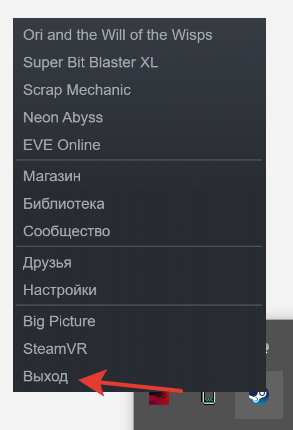
And go to the following path: C:\Program Files (x86)\Steam\config

We see a familiar "config.vdf" file, which we should replace with the equivalent from the log.
Replace:

Now we completely delete the contents of the following folders:
Return to C:\Program Files (x86)\Steam\ and look for your ssfn file there:

And again, we replace our ssfn from the log with ours and delete the original:


Now we just log into Steam through Big Picture and we don’t have any Steam Guard (we still need to select a password).

Rare folders
These folders may not be present in the log, but they can be a nice addition!
FileGrabber
Again, let's turn to the direct translation! "File interceptor" quite accurately describes the contents of the folder. It contains folders and files from the victim's computer that the stealer (the malware itself, transmitting information) was able to capture.

Don't be surprised by nested folders — everything is laid out the same way as on the user's PC. So, if folder X contained folder Y, that property will be preserved in the log.
The contents of the folder in my case:

Another interesting branching! The Desktop folder was clean, so let's move on to the most interesting part:

So, we've gone from porn games to information about games and user launchers! It couldn't be better. However, the Documents and Desktop folders are usually where the most important information is almost guaranteed to be.
I've used my own example to show how to work with this undoubtedly useful and sometimes amusing folder.
Wallets
Stores information about the user's desktop and e-wallets. Since it's not in my log, I'll use another example:

Contents - folders of wallets with the same name and relevant information about them.

There's nothing we can do about it at this stage, but if you do have this folder, you're quite possibly in luck, as the information you have can often be used to generate a conclusion or something similar. Any further steps are directly part of processing the log, which requires a separate article.
FTP
This folder stores files from file managers like FileZilla and TotalCommander, as well as information about the user's login servers. The presence of anything in this folder indicates that the victim has a server, dedicated server (a remote computer or server running 24/7), or website.

Example content:

In our case, the victim may well be the owner of the website or live at the specified address. However, even this information can often be useful for investigation, revealing the victim's IP address or allowing access to other sites.
Credit Cards
Contains, logically, information about the user's credit cards:
But where is the most important parameter? Where is the CVC/CVV? Unfortunately, the browser usually doesn't save them with the associated card, so we can't extract them from this file.
Example content:

A simple conclusion that can be confirmed later is that the cards, and therefore the majority of purchases, are most likely registered to profile 5, which is where you should look when processing.
An example of the file itself:

But the logical question is: "Why do I need all this information without the CVC/CVV code?"
What to do if you find the coveted code is a topic for a separate article.
Overall, it's a convenient and useful folder.
Telegram
Let's keep it short and to the point here.
The folder contains the victim's Telegram session files. If we want to access it, simply move the files from the folder to our Telegram folder on the PC, replacing the previous ones. Alternatively, you can use Telegram X to save your personal previous session.
You may be denied access to a session if the original user has changed their credentials or disabled session login without a password. In this case, you can try to brute-force it using the Passwords folder, which will be discussed later.
From correspondence and dialogues, you can find out a lot about the user or obtain private information.
The archive with the log looks like this:
They may look like this, it depends on the stealer and its presettings.
Let's quickly, concisely, and clearly understand what exactly is in the archive:
Frequent folders
The following folders will likely be present in the log if the user meets the conditions for their creation (if Steam or Discord aren't available, the corresponding folders won't be present either. But be careful! This doesn't work the other way around. That is, the absence of a folder doesn't always mean the service isn't present, but the absence of a service always means the absence of a folder).
Autofills
So what is AutoFills? A direct translation would say "automatic filling," which pretty accurately conveys the essence of the folder's contents.
Each of us has probably encountered the following window in our browser at least once:
Browser autofill suggestion
This is the exact data the folder stores. For example, in this case, Yandex remembered the value "Vilkin" for the "surname" field (most likely), and therefore immediately suggests it to me.
As you can see in the screenshot, the file name represents the browser that is the source of the autofill, which in our case is Chrome.
Inside, we will most likely encounter a text file of this format:
In each field, as the example has already been given, you can see the name of the field in which auto-replacement is performed, as well as the value being filled in under the names "Name" and "Value" respectively.
For greater clarity:
- Name - the name of the autoreplacement field.
- Value - the value to which the replacement is made.
If you hacked me, you would see the following picture (based on the example above):
- Name - "surname"
- Value - "Vilkin"
This folder is quite useful — it tells us a lot about the user, including values that may ultimately prove important and relevant when working with the log. For example, an address, postal code, phone number, name, or any other useful information. These values can also be used to determine the user's primary email address or primary account name — frequency of use will tell us everything.
Cookies
These are the ones that will make up a huge part of working with the log, and therefore it is important to analyze them in detail and understand what they mean.
To put it bluntly:
Cookies are files containing information collected during your visit to a website. This information is stored on your computer's hard drive and displays your preferences, most frequently visited topics, logins, and passwords.
To put it simply, a cookie can be considered a saved fragment of a user's session. So, even if we don't have the email password and login, we can still log in using that same fragment! The same can be done with any service that stores cookies.
It's logical that if a user logs out at the end of a session and a cookie was created in that format, we won't be able to log in the same way. Logging in using a cookie can also be considered a continuation of the previous user's session, so if that session ended when they logged out, there's nothing we can do about it.
Sometimes the folder may be missing. This happens if the victim's computer prevents third-party programs from extracting this information.
Just like in the AutoFills folder, the file names indicate the browser from which the cookie was retrieved. Furthermore, unlike in the previous folder, after the browser information, you'll see "Default Network" or "Profile X" (with any number in place of X). This indicates the browser profile. If it's a standard user/profile, it's "Default Network." Otherwise, as is common in families for convenience, it's "Profile."
The contents of the files don't really matter to us right now — there's little we can do with them at this stage. But that will change once we get down to work.
You can only look at the file creation date — if it's old enough, our cookies are quite possibly already dead. This means you won't be able to log in to your email or account using them.
Discord
This is where you'll find your Discord token — a unique account key consisting of a string of numbers and letters. You can use it to log in to your Discord account as follows:
Manually:
Open the main Discord page in your browser:
Open the developer menu (F12) and go to the Console section:
Then we insert the following code:
Code:
function login(token) {
 setInterval(() => {
  document.body.appendChild(document.createElement`iframe`)
         .contentWindow.localStorage.token = `"${token}"`;
 }, 50);
 setTimeout(() => {
  location.reload();
 }, 2500);
}
login('your token')
Where in place of the words your token should be, accordingly, your token:
Press Enter, wait a bit... And instead of the "Login" button, we have something new! Press it and enjoy!
More automated:
First, install the following plugin - https://chrome.google.com/webstore/detail/discord-token-login/ealjoeebhfijfimofmecjcjcigmadcai
Then we enter it and insert our token:
Click Login and you're done!
It's not the most important thing to work on, but it's interesting in terms of the information that can be obtained from the user's correspondence.
Steam
The only thing you can see in the Steam folder at first glance is a bunch of seemingly useless junk. In reality, this folder is a super-convenient thing.
Let's start with the first and most interesting thing. This is what will help us understand who this user is, even without accessing their email. What is this something, you ask? The "loginusers.vdf" file!
Let's open it with a text editor and see a bunch of information that's not entirely clear to us... What interests us here are the following numbers in the file:
An observant user might also notice other interesting parameters related to the user's account and preferences, but for now, let's focus on the numbers. Paste our numbers into the following link: steamcommunity.com/profiles/numbers/ (replace "numbers" with our value).
Let's move on:
Congratulations, we've reached our victim's profile! We can see their level, inventory count, achievements, games (if unlocked), and generally gather some background information before we begin our investigation.
Since we're talking about using files from this folder, let's finish the job! Let's look at Steam Guard! Yes, you might not need this part of the article until later, but it's best to dot the i's and cross the t's now.
First, let's log out of Steam:
And go to the following path: C:\Program Files (x86)\Steam\config
We see a familiar "config.vdf" file, which we should replace with the equivalent from the log.
Replace:
Now we completely delete the contents of the following folders:
- C:\Program Files (x86)\Steam\appcache
- C:\Program Files (x86)\Steam\userdata
Return to C:\Program Files (x86)\Steam\ and look for your ssfn file there:
And again, we replace our ssfn from the log with ours and delete the original:
Now we just log into Steam through Big Picture and we don’t have any Steam Guard (we still need to select a password).
Rare folders
These folders may not be present in the log, but they can be a nice addition!
FileGrabber
Again, let's turn to the direct translation! "File interceptor" quite accurately describes the contents of the folder. It contains folders and files from the victim's computer that the stealer (the malware itself, transmitting information) was able to capture.
Don't be surprised by nested folders — everything is laid out the same way as on the user's PC. So, if folder X contained folder Y, that property will be preserved in the log.
The contents of the folder in my case:
Another interesting branching! The Desktop folder was clean, so let's move on to the most interesting part:
So, we've gone from porn games to information about games and user launchers! It couldn't be better. However, the Documents and Desktop folders are usually where the most important information is almost guaranteed to be.
I've used my own example to show how to work with this undoubtedly useful and sometimes amusing folder.
Wallets
Stores information about the user's desktop and e-wallets. Since it's not in my log, I'll use another example:
Contents - folders of wallets with the same name and relevant information about them.
There's nothing we can do about it at this stage, but if you do have this folder, you're quite possibly in luck, as the information you have can often be used to generate a conclusion or something similar. Any further steps are directly part of processing the log, which requires a separate article.
FTP
This folder stores files from file managers like FileZilla and TotalCommander, as well as information about the user's login servers. The presence of anything in this folder indicates that the victim has a server, dedicated server (a remote computer or server running 24/7), or website.
Example content:
In our case, the victim may well be the owner of the website or live at the specified address. However, even this information can often be useful for investigation, revealing the victim's IP address or allowing access to other sites.
Credit Cards
Contains, logically, information about the user's credit cards:
- Owner's full name
- Card type
- Card number
- Best before date
But where is the most important parameter? Where is the CVC/CVV? Unfortunately, the browser usually doesn't save them with the associated card, so we can't extract them from this file.
Example content:
A simple conclusion that can be confirmed later is that the cards, and therefore the majority of purchases, are most likely registered to profile 5, which is where you should look when processing.
An example of the file itself:
But the logical question is: "Why do I need all this information without the CVC/CVV code?"
- Many websites may require this information to recover something. Furthermore, the victim's name can also be found here.
- The CVC/CVV code can sometimes be found in the AutoFills folder. You can also try to find the necessary information from cloud storage, email, or other user data.
What to do if you find the coveted code is a topic for a separate article.
Overall, it's a convenient and useful folder.
Telegram
Let's keep it short and to the point here.
The folder contains the victim's Telegram session files. If we want to access it, simply move the files from the folder to our Telegram folder on the PC, replacing the previous ones. Alternatively, you can use Telegram X to save your personal previous session.
You may be denied access to a session if the original user has changed their credentials or disabled session login without a password. In this case, you can try to brute-force it using the Passwords folder, which will be discussed later.
From correspondence and dialogues, you can find out a lot about the user or obtain private information.


