

Carding Forum
Professional
- Messages
- 2,788
- Reaction score
- 1,297
- Points
- 113
Those who have dealt with the electronic payment service Stripe know that it is perfectly tailored for developers. Its documentation is written by humans for humans; there is a good test mode - a complete copy of the real one, and to switch to live mode, you only need to replace the keys without touching the API and without getting any surprises; the test mode admin panel is also a complete copy of the combat mode. In general, Stripe is good, and I want to devote this article to the basic issues of integrating a service into an e-Commerce project, explaining the processes using concrete and abstract examples. I hope that my experience will help everyone who wants to try Stripe on their project.
However, before using Stripe, ask the question, "Where is the business that we will be serving?" For example, if the business is Russian, Stripe is useless for us: you can accept payments from any country, but the business of the owner of a Stripe account must be legally registered in one of the available countries. Otherwise, it is impossible to create and authorize an account. The list of countries can be viewed here. If you want to withdraw money to other accounts, for example, suppliers (I will tell you how to do this below), then, legally, the suppliers must also be located in the countries that Stripe works with. The client's business I worked with was registered in America, which allowed payments to be made through Stripe.
You also need to be prepared that Stripe does not support the 3-D-secure xml protocol, which requires the client to enter the confirmation code received in the SMS message. Stripe just tries to make a payment without this option, and if the bank accepts payments without 3-D Secure - well, if not - everything will end with a refusal, and you won't be able to pay with this card.
To transfer money from a customer card to our Stripe account, we need to do the following. Using the Stripe.js script, we will get a Stripe token on the frontend. Next, we will use a token from the server side to process the payment itself.
We connect Stripe.js and specify the public key:
We make a regular HTML form, specify the data-stripe attributes on the input for the script to work. We will need the client card number, year and month of card validity and CVC. Stripe does not require the owner's first and last name.
Now we get the token:
Just in case: this step is described in the official documentation.
Now we can write off money from the client through the server. Examples of PHP code.
That's all you need to do to transfer money from your customer card to your Stripe account.
Now let's look at the translation using a working example. Let's say you're writing a platform that sells rare books from small publishers around the world. You need to transfer money to your publisher suppliers to send the book to the client, and charge yourself a $ 10 commission on each sale. You don't want to bother with monthly reports and payments, you just want to transfer money every time a customer pays. Stripe allows it.
As before, the prerequisite for setting up automatic transfers is that the provider is located in one of the countries supported by Stripe.
Stripe has a great thing called Managed Acounts. With this option, we kind of create a Stripe account for our supplier, but we take care of all the account management, so the publisher itself doesn't need to register with Stripe.
First, let's get your publisher's bank account information using the Stripe.js script we already know. As in the case of debiting money from a client's card, for operations with a bank account, we also need a Stripe token.
This is also described in the documentation .
Remark... Keep in mind that for each country the bank details (routing_number, account_number) are filled in differently. For example, for European countries you need to get an IBAN number. It is put in the account_number field, and routing_number is not sent at all. Also, for some countries, internal account numbers are glued into one line and recorded in the fields. For example, to get the correct bank identification routing_number for Canada, you glue the transit number and the institution number (transit number + institution number). If the transit number is 02345 and the institution number is 987, then the routing_number will be '02345987'. The account number varies from bank to bank. And for Germany, you only need an IBAN number, it is filled in the routing_number field. For example, IBAN: DE89370400440532013000 (22 characters). How to fill in these fields for other countries, here.
So, now we have a bank account token where we can withdraw money to suppliers. Let's create a Managed Account. Let our publishing house be located in America, is a company, not an individual entrepreneur, and we pay him in US dollars.
It would seem that now we have a Managed Account, and we can transfer money, but no: the account needs to be verified. To do this, you need to provide Stripe with certain legal information about the company. What information is needed and in which countries is described here.
So, for a publishing house in America, we need to provide:
Stripe's terms of service are here. The person on whose behalf the Managed Account will be created must accept them.
Stripe may also ask for additional information. For America, these are:
We collect the necessary information and edit the account.
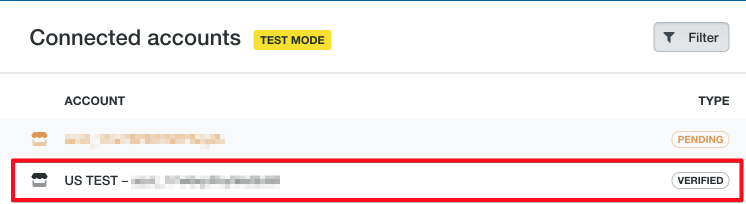
Now the Stripe team will check everything, and in the admin panel we will see the Verified status.
 dashboard.stripe.com
But that won't be enough for us. Also, the Stripe command can indicate data errors or require additional information, such as personal_id_number.

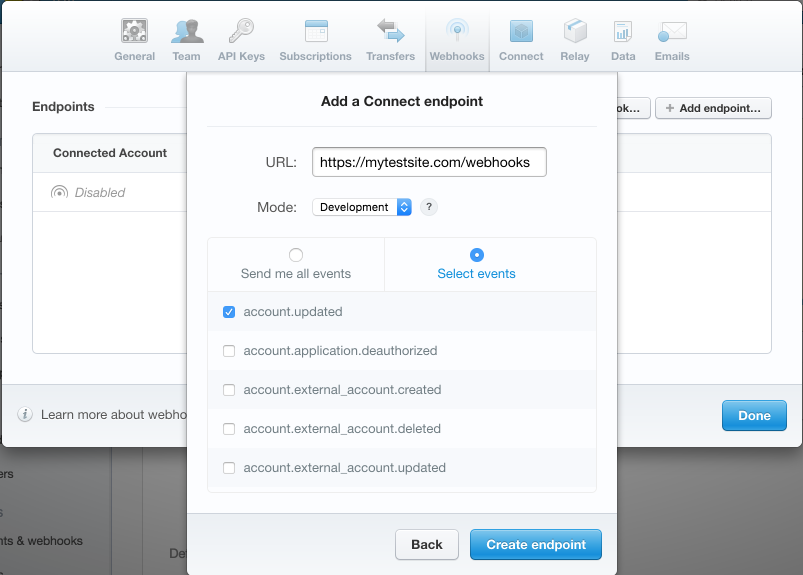
When the team verifies the details, the account will be updated. A webhook can be configured for this event .
The required fields will be described in the account object:
Stripe can also set a deadline for the provision of data. If there is a date, it will be in the $ account-> verification-> due_by property.
For testing verification, Stripe provides a good testing environment. With the help of transfers from certain test cards, we can simulate different scenarios for the verification of accounts. Examples of such scenarios:
How to specifically simulate these cases is described here.
You will have to handle all situations in any case. And in my experience, it's best to provide Stripe with as much information as possible right away to avoid account deactivation surprises.
When everything is ok, and Stripe has verified your Managed Account, you need to enable transfers using the API or disable automatic transfers - it's the same thing.
dashboard.stripe.com

So, we have a verified account, transfers are included, and now we can make money transfers directly to the supplier.
Let's say we have a book. The vendor wants $ 50 for it, we want $ 10 of commission for ourselves, plus we need to include in the price Stripe's commission for the transfer. Stripe now charges 2.9% + 30 ¢ for each transfer. We decided that we would pay the commission from our share. Then the user has to pay $ 60 for the book. Of our share, we'll give $ 2.04 to Stripe's commission.
We receive a token using Stripe.js and make a payment from the server side.
The application_fee property allows you to specify how much of the transfer to leave on our account. Stripe fees will only be debited from our account in any case, even if we make a full transfer to the supplier.
The money will not immediately come to the supplier's bank account, they are withdrawn every seven days. Those. we transfer money to our supplier's Stripe account, and after seven days, the money is transferred to the account in the linked bank account.
In addition, Stripe allows you to save customers, add custom metadata when creating a payment to make it easier to navigate the payments made, set a description when paying for a more informative description, and much more. All this can be found in the documentation for the payments API.
I wish you the best of luck with your Stripe integration! I would be glad to receive your comments, questions and clarifications, which will help to complement the article.
Custom HTML form to get token
Managed Accounts
Get token for bank account
Required banking information by country
Required legal information for Managed Accounts by country
Stripe Terms of Use
Testing Webhooks
Account Verification
Stripe Pricing
Stripe API Reference
However, before using Stripe, ask the question, "Where is the business that we will be serving?" For example, if the business is Russian, Stripe is useless for us: you can accept payments from any country, but the business of the owner of a Stripe account must be legally registered in one of the available countries. Otherwise, it is impossible to create and authorize an account. The list of countries can be viewed here. If you want to withdraw money to other accounts, for example, suppliers (I will tell you how to do this below), then, legally, the suppliers must also be located in the countries that Stripe works with. The client's business I worked with was registered in America, which allowed payments to be made through Stripe.
You also need to be prepared that Stripe does not support the 3-D-secure xml protocol, which requires the client to enter the confirmation code received in the SMS message. Stripe just tries to make a payment without this option, and if the bank accepts payments without 3-D Secure - well, if not - everything will end with a refusal, and you won't be able to pay with this card.
Payment processing
To transfer money from a customer card to our Stripe account, we need to do the following. Using the Stripe.js script, we will get a Stripe token on the frontend. Next, we will use a token from the server side to process the payment itself.
We connect Stripe.js and specify the public key:
Code:
<script type="text/javascript" src="https://js.stripe.com/v2/"></script>
<script type="text/javascript">
  Stripe.setPublishableKey('your_public_key');
</script>
We make a regular HTML form, specify the data-stripe attributes on the input for the script to work. We will need the client card number, year and month of card validity and CVC. Stripe does not require the owner's first and last name.
Code:
<form action="" method="POST" id="payment-form">
    <span class="payment-errors"></span>
    <label>Card Number</label>
    <input type="text" size="20" data-stripe="number">
    <label>Expiration (MM/YY)</label>
    <input type="text" size="2" data-stripe="exp_month">
    <input type="text" size="2" data-stripe="exp_year">
    <label>CVC</label>
    <input type="text" size="4" data-stripe="cvc">
    <input type="submit" class="submit" value="Submit">
</form>
Now we get the token:
Code:
$ (function () {
  var $ form = $ ('# payment-form');
  $ form.submit (function (event) {
    // Disable the button to prevent repeated clicks
    $ form.find ('. submit'). prop ('disabled', true);

    // Request a token from Stripe
    Stripe.card.createToken ($ form, stripeResponseHandler);

    // Disable the form submit
    return false;
  });
});

function stripeResponseHandler (status, response) {
  // Get the form:
  var $ form = $ ('# payment-form');

  if (response.error) {// Problem!

    // Show errors in the form:
    $ form.find ('. payment-errors'). text (response.error.message);
    $ form.find ('. submit'). prop ('disabled', false); // Allow submit

  } else {// Token has been created

    // Get the token id:
    var token = response.id;

    // Insert a token into the form so that on submit it comes to the server:
    $ form.append ($ ('<input type = "hidden" name = "stripeToken">'). val (token));

    // Submit the form:
    $ form.get (0) .submit ();
  }
};
Just in case: this step is described in the official documentation.
Now we can write off money from the client through the server. Examples of PHP code.
Code:
// Installing the secret key
\Stripe\Stripe::setApiKey("your_secret_key");

// We take the token from the form
$token = $_POST['stripeToken'];

// Create payment
try {
  $charge = \Stripe\Charge::create(array(
    "amount" => 1000, // amount in cents
    "currency" => "usd",
    "source" => $token,
    "description" => "Example charge"
    ));
} catch(\Stripe\Error\Card $e) {
  // Payment failed
}
That's all you need to do to transfer money from your customer card to your Stripe account.
Automatic money transfers to your suppliers
Now let's look at the translation using a working example. Let's say you're writing a platform that sells rare books from small publishers around the world. You need to transfer money to your publisher suppliers to send the book to the client, and charge yourself a $ 10 commission on each sale. You don't want to bother with monthly reports and payments, you just want to transfer money every time a customer pays. Stripe allows it.
As before, the prerequisite for setting up automatic transfers is that the provider is located in one of the countries supported by Stripe.
Stripe has a great thing called Managed Acounts. With this option, we kind of create a Stripe account for our supplier, but we take care of all the account management, so the publisher itself doesn't need to register with Stripe.
First, let's get your publisher's bank account information using the Stripe.js script we already know. As in the case of debiting money from a client's card, for operations with a bank account, we also need a Stripe token.
Code:
Stripe.bankAccount.createToken ({
   country: $ ('. country'). val (), // 2-character country code (US)
   currency: $ ('. currency'). val (), // 3-character currency code (USD)
   routing_number: $ ('. routing-number'). val (), // bank identification number
   account_number: $ ('. account-number'). val (), // bank account number
   account_holder_name: $ ('. name'). val (), // name of the business owner (in our example, the publisher)
   account_holder_type: $ ('. account-holder-type'). val () // account type - individual, company
}, stripeResponseHandler);
This is also described in the documentation .
Remark... Keep in mind that for each country the bank details (routing_number, account_number) are filled in differently. For example, for European countries you need to get an IBAN number. It is put in the account_number field, and routing_number is not sent at all. Also, for some countries, internal account numbers are glued into one line and recorded in the fields. For example, to get the correct bank identification routing_number for Canada, you glue the transit number and the institution number (transit number + institution number). If the transit number is 02345 and the institution number is 987, then the routing_number will be '02345987'. The account number varies from bank to bank. And for Germany, you only need an IBAN number, it is filled in the routing_number field. For example, IBAN: DE89370400440532013000 (22 characters). How to fill in these fields for other countries, here.
So, now we have a bank account token where we can withdraw money to suppliers. Let's create a Managed Account. Let our publishing house be located in America, is a company, not an individual entrepreneur, and we pay him in US dollars.
Code:
\Stripe\Stripe::setApiKey("your_secret_key");
$account = Account::create([
   "country" => 'US',
   "managed" => true,
]);
if (isset($account->id)) {
   try {
       $account->external_accounts->create(
           ["external_account" => $token] // our bank account token
       );
   } catch (InvalidRequest $error) {
       // creation error occured
   }
}
It would seem that now we have a Managed Account, and we can transfer money, but no: the account needs to be verified. To do this, you need to provide Stripe with certain legal information about the company. What information is needed and in which countries is described here.
So, for a publishing house in America, we need to provide:
| Name | Description |
|---|---|
| legal_entity.address.city | City where the company is located |
| legal_entity.address.line1 | Company address |
| legal_entity.address.postal_code | Postcode |
| legal_entity.address.state | State |
| legal_entity.business_name | The name of the company |
| legal_entity.business_tax_id | Tax identification number |
| legal_entity.dob.day | Birthday of the owner of the company |
| legal_entity.dob.month | Month of birth of the owner of the company |
| legal_entity.dob.year | Year of birth of the owner of the company |
| legal_entity.first_name | Company owner name |
| legal_entity.last_name | Surname of the owner of the company |
| legal_entity.ssn_last_4 | The last four digits of the social security number of the company owner |
| legal_entity.type | individual / company |
| tos_acceptance.date | Stripe Terms of Service Acceptance Date |
| tos_acceptance.ip | The IP address from which the Stripe Terms of Service were accepted |
Stripe's terms of service are here. The person on whose behalf the Managed Account will be created must accept them.
Stripe may also ask for additional information. For America, these are:
| Name | Description |
|---|---|
| legal_entity.personal_id_number | Personal identification number |
| legal_entity.verification.document | Scan of an identity document |
We collect the necessary information and edit the account.
Code:
\Stripe\Stripe::setApiKey("your_secret_key");
$account = Account::retrieve($accountId);
$account->legal_entity->address->city = 'New-York';
$account->legal_entity->address->state = 'New-York';
$account->legal_entity->address->postal_code = '00501';
$account->legal_entity->address->line1 = 'Some address';
$account->legal_entity->business_name = 'US TEST';
$account->legal_entity->business_tax_id = '00000001';
$account->legal_entity->dob->day = 1;
$account->legal_entity->dob->month = 1;
$account->legal_entity->dob->year =  1980;
$account->legal_entity->first_name = 'Bob';
$account->legal_entity->last_name = 'Smith';
$account->legal_entity->type = 'company';
$account->legal_entity->ssn_last_4 = '0000';
$account->tos_acceptance->date = 1466074123; // timestamp
$account->tos_acceptance->ip = 123.123.123.123;
try {
   $account->save();
   } catch (InvalidRequest $error) {
// error while saving
  }
Now the Stripe team will check everything, and in the admin panel we will see the Verified status.
Stripe Login | Sign in to the Stripe Dashboard
Sign in to the Stripe Dashboard to manage business payments and operations in your account. Manage payments and refunds, respond to disputes and more.
But that won't be enough for us. Also, the Stripe command can indicate data errors or require additional information, such as personal_id_number.
When the team verifies the details, the account will be updated. A webhook can be configured for this event .
The required fields will be described in the account object:
Code:
$account->verification->fields_neededStripe can also set a deadline for the provision of data. If there is a date, it will be in the $ account-> verification-> due_by property.
For testing verification, Stripe provides a good testing environment. With the help of transfers from certain test cards, we can simulate different scenarios for the verification of accounts. Examples of such scenarios:
- the data is not filled in, and we cannot make transfers at all;
- the limit on the size of the payment has been triggered. This happens if Stripe thinks that the translation is too large and the information provided is insufficient. In this case, it disables the Managed Account;
- deactivation of an account with the requirement to enter data by a certain date;
- uploading a scan of a document confirming the identity of the account owner;
- accepting and rejecting this scan.
How to specifically simulate these cases is described here.
You will have to handle all situations in any case. And in my experience, it's best to provide Stripe with as much information as possible right away to avoid account deactivation surprises.
When everything is ok, and Stripe has verified your Managed Account, you need to enable transfers using the API or disable automatic transfers - it's the same thing.
Stripe Login | Sign in to the Stripe Dashboard
Sign in to the Stripe Dashboard to manage business payments and operations in your account. Manage payments and refunds, respond to disputes and more.
So, we have a verified account, transfers are included, and now we can make money transfers directly to the supplier.
Let's say we have a book. The vendor wants $ 50 for it, we want $ 10 of commission for ourselves, plus we need to include in the price Stripe's commission for the transfer. Stripe now charges 2.9% + 30 ¢ for each transfer. We decided that we would pay the commission from our share. Then the user has to pay $ 60 for the book. Of our share, we'll give $ 2.04 to Stripe's commission.
We receive a token using Stripe.js and make a payment from the server side.
Code:
$charge = Charge::create([
   "amount" => 6000, // в центах
   "currency" => 'USD',
   "source" => $token,
   "application_fee" => 1000,
   "destination" => $managedAccountId
]);
The application_fee property allows you to specify how much of the transfer to leave on our account. Stripe fees will only be debited from our account in any case, even if we make a full transfer to the supplier.
The money will not immediately come to the supplier's bank account, they are withdrawn every seven days. Those. we transfer money to our supplier's Stripe account, and after seven days, the money is transferred to the account in the linked bank account.
Additional features
In addition, Stripe allows you to save customers, add custom metadata when creating a payment to make it easier to navigate the payments made, set a description when paying for a more informative description, and much more. All this can be found in the documentation for the payments API.
I wish you the best of luck with your Stripe integration! I would be glad to receive your comments, questions and clarifications, which will help to complement the article.
Useful links:
Countries that support StripeCustom HTML form to get token
Managed Accounts
Get token for bank account
Required banking information by country
Required legal information for Managed Accounts by country
Stripe Terms of Use
Testing Webhooks
Account Verification
Stripe Pricing
Stripe API Reference


