

Carding
Professional
- Messages
- 2,871
- Reaction score
- 2,467
- Points
- 113
Like humans, computers have their own destiny and it often develops in different ways. Some lead a measured life and quietly retire at the appointed time. Others are destined to write their name in history, become a recognized legend and even give rise to an entire subculture. The release of the fourth revision of the popular raspberry Pi single-Board does not leave skeptics a single chance: the English microcomputer is with us seriously and for a long time.

Having received the affectionate nickname "Malinka" among the people, RPi has become a kind of ZX Spectrum for the modern era. Parallels can be drawn for a long time: both computers were born in England (and not just anywhere, but in Cambridge!), both were intended primarily for education, but they easily "outgrown" the allotted framework. Being not the most productive for their time, they attracted users with a democratic price, simplicity and, of course, support from the community.
At least the founder of the Raspberry Pi Foundation Eben Upton until he is knighted by the Queen of England, as Clive Sinclair was almost forty years ago, there is no doubt that public recognition of his services is yet to come. It is quite possible that in a couple of decades, one of the new generation of hackers and programmers will warmly remember their first raspberry microcomputer, which helped them decide on their life path. Yes, Linus Torvalds studied programming in Sinclair QL, in case you didn't know!
INFO
About sir Clive Sinclair and the development of the first microcomputers at Sinclair Research, an art and historical film was shot Micro Men movie with Martin Freeman in one of the main roles. The success of his other work the TV series "Sherlock" this picture did not get, but if the fate of the pioneers of it interests you at least a little, the film is definitely worth watching.
I think now you can see why I just couldn't pass you by Raspberry Pi 4 and I bought this single-Board card as soon as it appeared in our free sale and maximum configuration. Official deliveries to Russia, as far as I know, have not yet been made, but Resellers have made a good fuss in time and brought some "raspberries" for the most impatient enthusiasts. It's time to find out what the current update has in store for us!
Board overview
Interesting details can be found already in the configuration. The Board is not Packed in an antistatic bag and this is strange. Eben Upton mentioned that his team is trying to reduce the cost of production of the Raspberry Pi as much as possible, but this is some kind of radical cost optimization. You'd expect to see similar savings when applied to Raspberry Pi Zero for $5, but not to the flagship model for $55.
However, all these are the little things of life that you immediately forget about as soon as you read the paper instructions. You probably already know that the fourth version of odnoplatnik comes with different amounts of RAM to choose from. In the summer, the Raspberry Pi Foundation announced the appearance of three variants at once, with LPDDR4 chips with a capacity of one, two or four gigabytes. But the instructions contain a mention of another version, which, apparently, did not reach the release by as much as eight gigabytes! Wow!
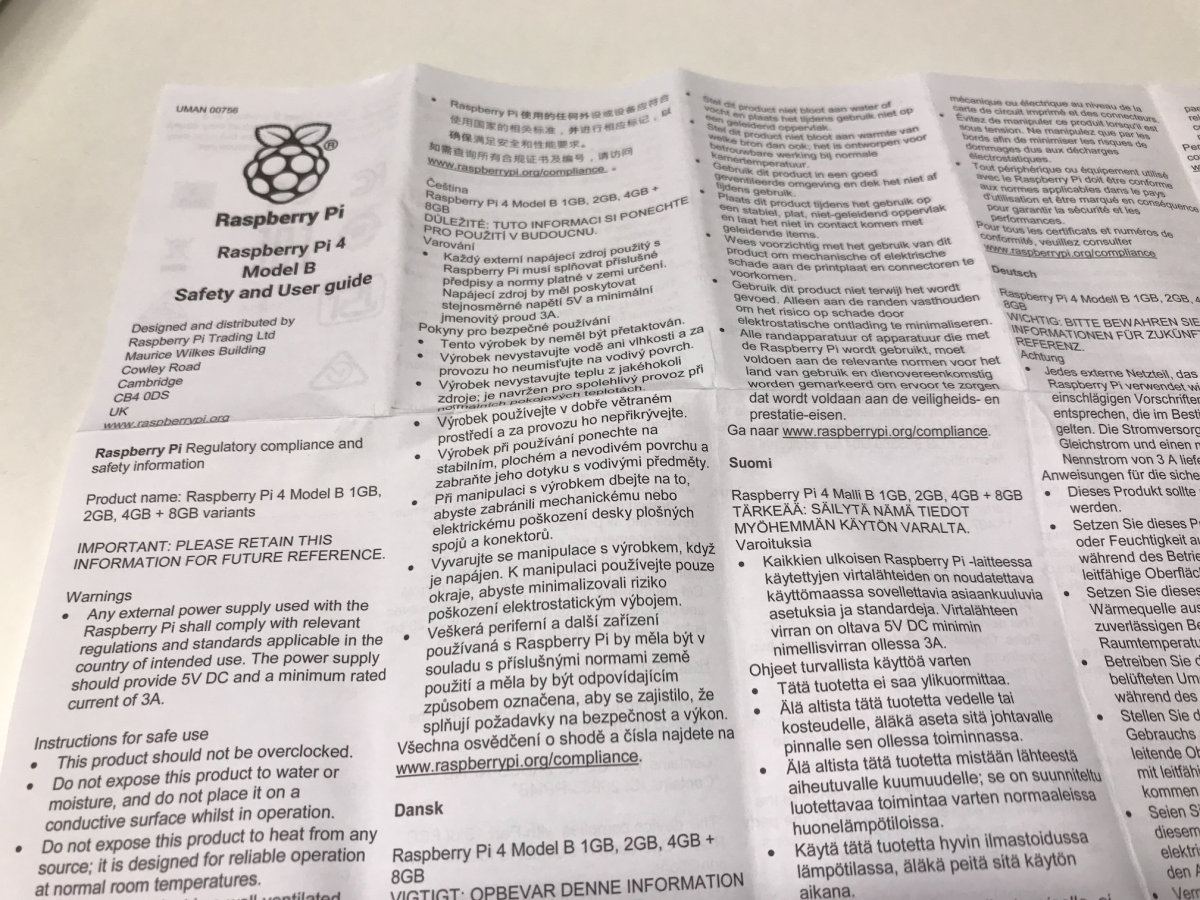
There was not a word about it in the news, and we can only guess why the developers decided to abandon this model. It is quite possible that the final cost of a raspberry with such a memory chip turned out to be too high and did not fit into the philosophy of a cheap computer, which they try to adhere to in Cambridge. In addition, do not forget that the release of a new generation in several versions at once is a bold experiment, and no one in the organization itself yet knows which model will eventually be the most popular among users.
In this situation, postponing the release of the eight-Gigabyte version and evaluating the demand for its nearest equivalent with four is quite a logical step. So the probability of an even more productive Raspberry Pi remains, especially since developers will have to somehow fix the hardware compatibility problem with some power supplies (more on this below).
Further inspection of the microcomputer itself did not bring such unexpected surprises. As stated, the form factor has remained the same, but the location and set of connectors have changed slightly, which is why the single Board has lost backward compatibility with some of the previous accessories. By the way, this is the first time this has happened in the history of the Raspberry Pi, except for the original models with full-size SD cards. Was it worth it?
The first thing that catches your eye is that the RJ45 connector for Gigabit Ethernet has been swapped with a pair of USB ports, moving it closer to the PoE pins. Of course, such a change suggested itself and only made the wiring of the Board easier. By the way, now the network and USB peripherals hang on separate interfaces. Before that, they were United by a common hub, which created problems when used simultaneously.
In addition, we finally have two USB 3.0 ports, without which it would be very sad in 2019. This means that it is now possible to connect external SSDS and other modern high-speed peripherals like Webcams with 4K resolution. You can even build your own budget NAS, since a bundle of USB 3.0 and Gigabit Ethernet leads to a certain kind of madness for example, RAID on an SSD. By the way, the VIA VL805 chip responsible for USB communicates with the processor via PCI Express, and enthusiasts almost immediately found a way work with even faster NVMe drives by simply unsoldering the USB hub from the Board. Cool hardware hack!
The full-size HDMI connector was removed from the side, replacing it with a pair of Micro-HDMI 2.0. Alas, they are close to each other, and because of this, it will be inconvenient to connect adapters with thick connectors on the tails. But now it is possible to display the image on two displays at once. The manufacturer in the announcements immodestly writes that it supports "up to two displays and up to 4K@60", but in fact you have to choose: either two displays at 30 frames, or one, but with a smooth image.
Compared to the tiny connectors of video interfaces, the old-school 3.5 mm audio Jack seems huge. Surprisingly, the engineers not only decided to keep it, but also did not throw out the ability to output an analog video signal to it! So everyone can try to breathe life into old TVs and emulate retro games on an authentic screen.
But with the Mini-USB connector, the developers said goodbye, now in its place you will find USB Type-C. According to the creators, this allows you to feed the new "stone", whose appetites have grown to 3 amps under load in total, an impressive 15 Watts of consumption. How true such bold statements are, we will definitely find out a little later, but for now I'll just note that the implementation of the USB Power Delivery standard on the new Board broke compatibility with current power supplies for some users (including me). If this problem is critical for you, you should wait for the next revision of the Board, in which the developers promised to fix the flaw.
The microSD slot was left in its rightful place. If you were counting on a built-in flash drive in a new generation (like the RPi Compute Module, for example), alas and Ah - your hopes did not come true. I'm also a little disappointed, to be honest. On the Raspberry Pi 2, this connector was not the most successful design and it got loose on my Board after some time, so the system was successfully loaded from the memory card every other time.
The GPIO pins are also unchanged. On the one hand, this allowed us to maintain compatibility with existing expansion cards, which is nice. On the other hand, as before, the output RESET signal is very lacking to force a system reboot (for example, automatically using a supervisor chip). In addition, it would be great to have at least a couple of additional USB interfaces on this connector — so that it is convenient to use those peripherals that are not supposed to be reconnected too often (such interfaces can almost always be found at the bottom of regular desktop motherboards).
Most SoC: BCM2711
However, the most interesting changes occurred, of course, with the Central processor. Now this is SoC BCM2711 with four cores Cortex-A72 based on the ARMv8 architecture, which brings system performance to a qualitatively different level. Previous models were based on cores from Cortex-A7 (Raspberry Pi 2) to Cortex-A53 (Raspberry Pi 3+), so with this update, developers jumped several steps at once.
First of all, this was facilitated by the transition to the 28 nm process technology. Chips on all previous versions of the single Board were manufactured using 40 nm technology, and with the release of BCM2873 on RPi 3+, engineers ran into limitations on the crystal area. Higher-performance cores required more transistors, which simply had nowhere to be placed. As you can see, while Intel and AMD unsuccessfully storm the threshold of 10 nm in the development of x86 processors, other-more modest-companies feel quite comfortable on already proven and long-tested technical processes.
At the moment, the documentation for the BCM2711 chip is not publicly available, but you can partially satisfy your curiosity by reading using the manual on Cortex-A72.
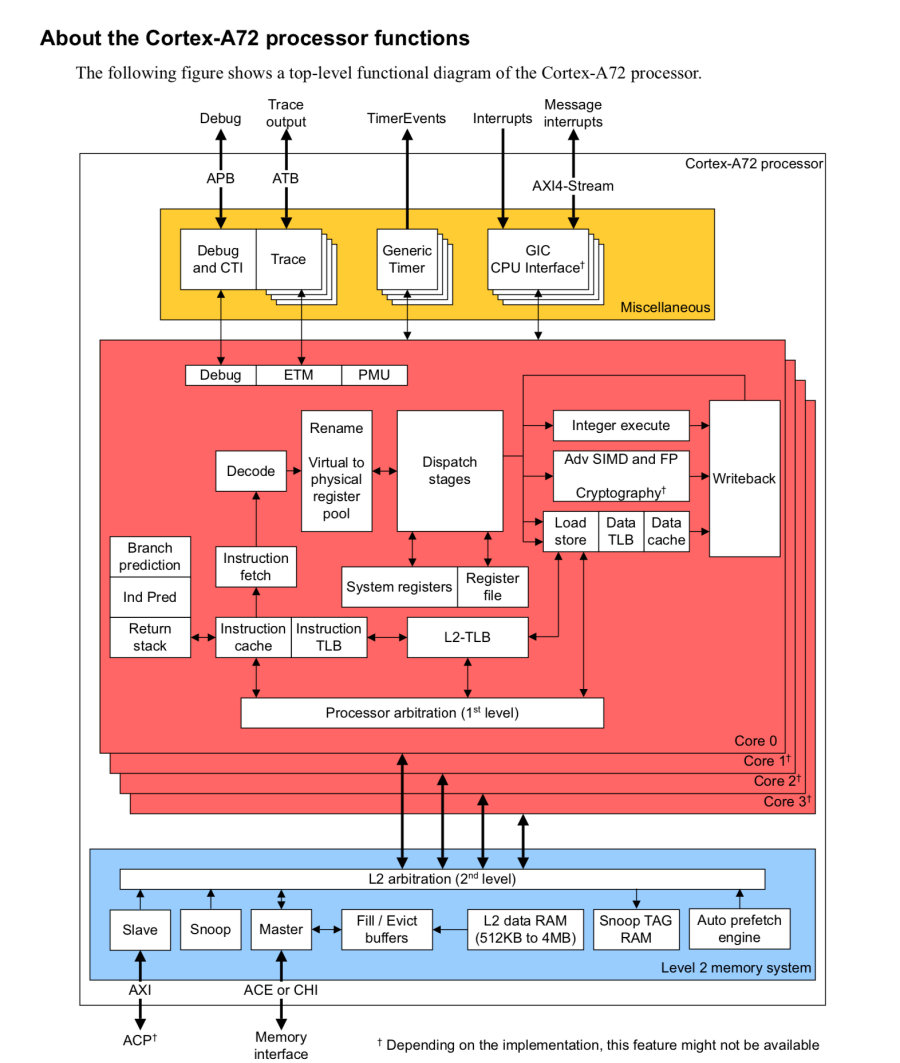
As for the peripherals, the new system-on-a-chip has received a three-dimensional graphics accelerator Videocore VI (500 MHz, 2160p). There isn't much information on the GPU right now, either, and we can only hope that after some time Broadcom will support the community and post an appropriate reference, as happened with Videocore IV on the second anniversary of the Raspberry Pi project. Still, Eben Upton has repeatedly stated that their ultimate goal is to make the single-board platform as open as possible over time.
Interesting features
I'll go through the most important points that I noticed when working with RPi 4.
USB PD issue
Just above, I already noticed that the new microcomputer is picky in terms of power supply and will not work on every charge. So, my calculation to use a power supply unit with USB-C from the MacBook Pro together with the raspberry was not justified: they simply could not agree. But I've been waiting for a similar moment since 2017 - otherwise, why even start this whole painful transition to a unified connector?!
Let's try to understand what the problem is here. Some users on the forums it was suggested that Apple laptop power supplies do not support charging with a voltage of 5 V. But this is not the case: a sticker on one of the charging sides confirms that the device implements the USB Power Delivery standard with 5/12/20 volt levels. You can easily verify this by simply connecting a regular smartphone to the power supply via a suitable cable.
In fact, the reason lies in the raspberry Pi scheme and partly in the method of electronic identification (eMark) of cables from some manufacturers (Apple, Dell, and others). I suggest you make sure of this together. To do this, you will have to find the documentation (PDF) on the site and take a closer look at the Pinout of the USB-C connector.
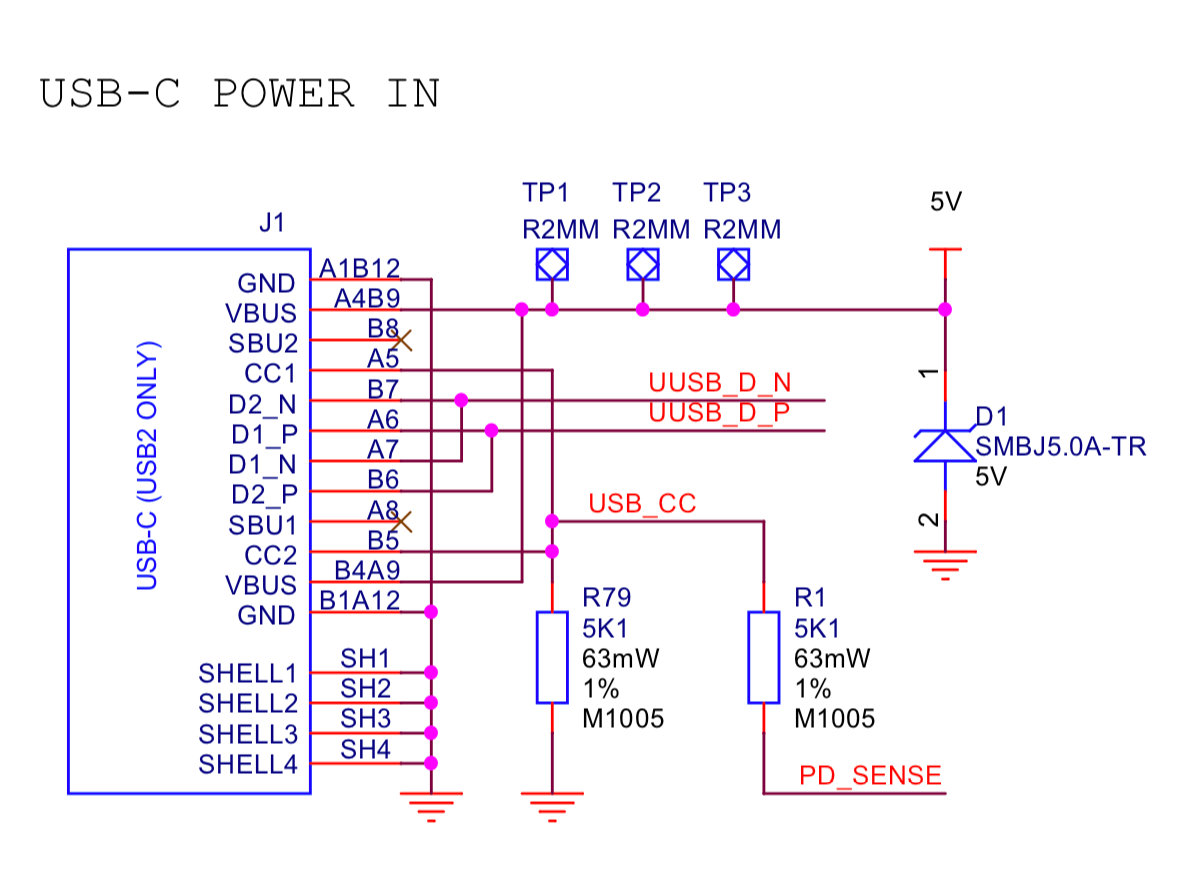
Here is the resistor R79 connects to GND not one, but both contacts СС1 and CC2. Besides, R1 goes to the Board's power controller, although it should also be connected to ground. The correct scheme is shown in the figure below.
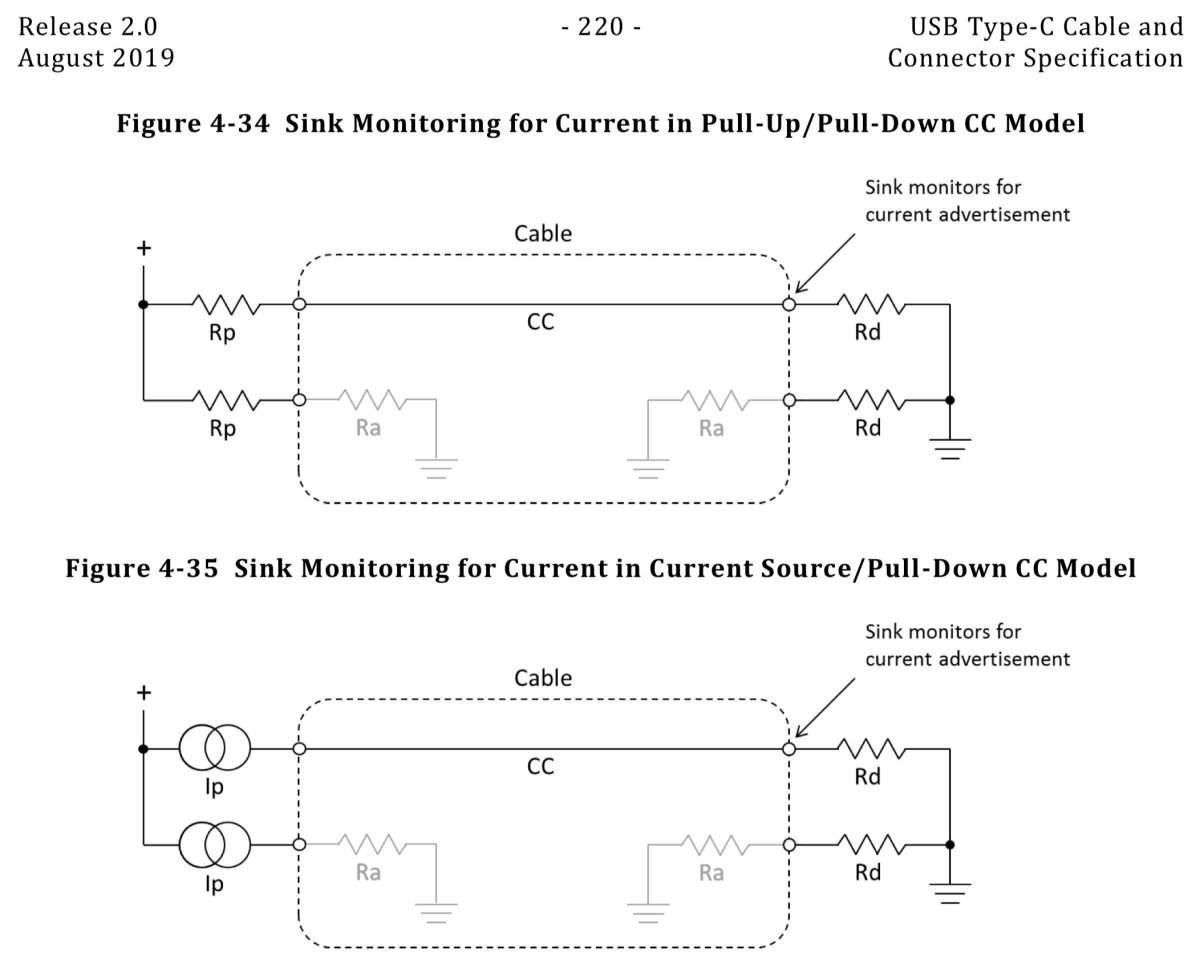
You can read more about the issue here on the page Tyler Ward.
Hidden JTAG
The curious surprises don't end there. After turning the raspberry for a couple of minutes in your hands, you will probably find that on the reverse side, under the USB connectors, another mysterious interface is separated without any soldered connector. It's labeled as J5 on the Board, but that alone doesn't explain much.
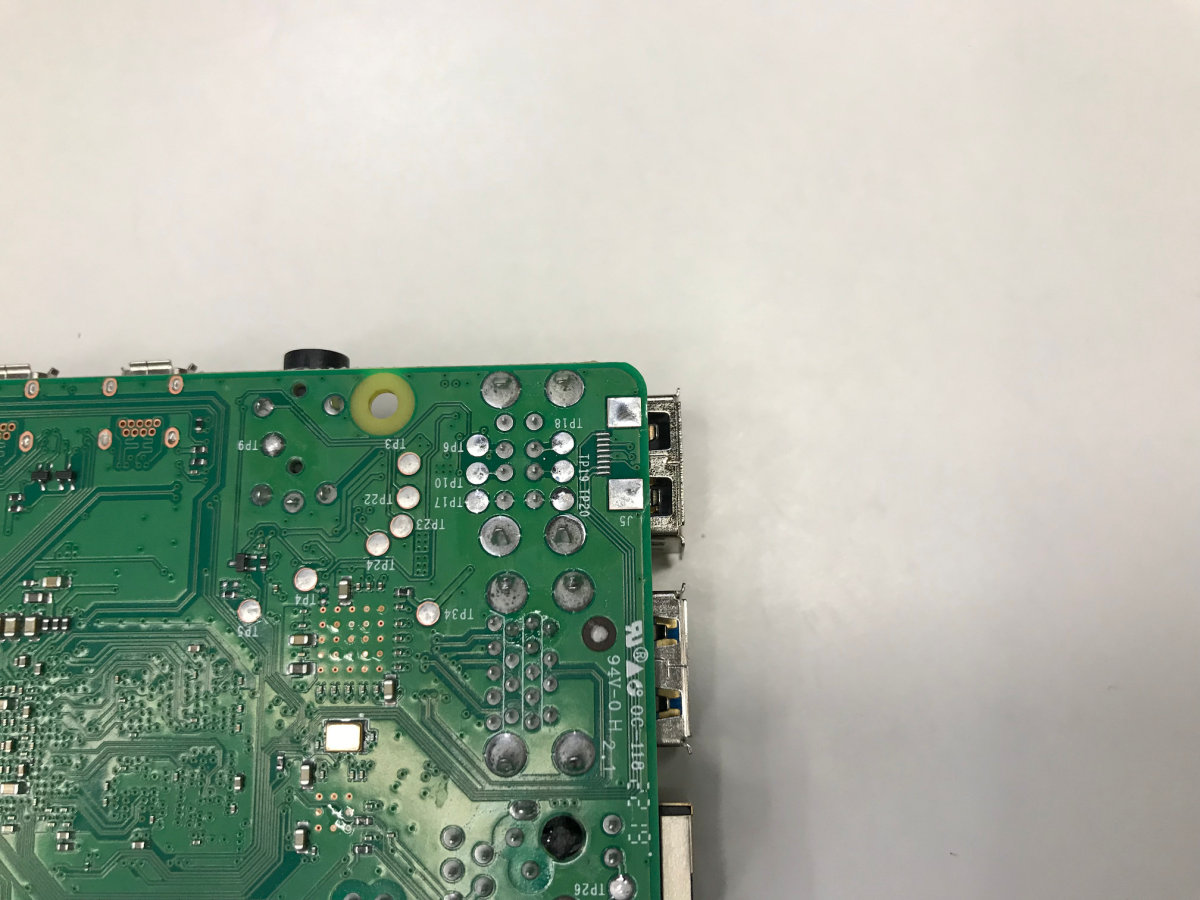
Let's try to guess its origin based on the number of contacts. Obviously, this is not an ordinary UART or USB — there are as many as seven conductors here. Apparently, it is assumed that the average user will never need this connector. Hmm, what can a developer be so special about?
What if this is an interface for debugging? Of course! Several searches in the search engine shed light on the purpose of the mysterious J5 connector: this is the JTAG of the Videocore graphics accelerator. It turns out that someone on the Internet has already asked this question, you can read the details. in the note Andy Kirby.
Downloading from EEPROM
Another notable feature of the new Raspberry Pi is booting from a chip soldered to the Board SPI EEPROM. If you remember, earlier a single-payer needed a 'bootcode' to start.bin ' in the boot partition of the memory card. In the new Raspbian distribution, this file remains in its place, but only to support previous versions of the computer.
The developers themselves indicate several reasons for this decision. First, the complexity of the interfaces on which memory and peripherals are connected has increased now these are LPDDR4 and PCI Express, and they require much more code for initialization. Previously, it was possible to compactly place everything in the ROM area on the SoC itself, but now there was not enough space for them.
Secondly, the team has big plans to add new features: for example, in the near future they promise to implement booting from USB and over Ethernet. It's sad that this feature is not available to us since the start of sales of the device, but at least it's clear what exactly to expect in the firmware updates.
Finally, do not forget that this method makes it easier to fix errors (or add new ones!). By the way, with similar goals, you can pick up the Downloader and its beta version yourself:
Tests
Today, single-board cards are mass-produced in a wide variety of form factors, and only large companies in this market can easily be counted with a dozen. Of course, the Raspberry Pi Foundation stands out favorably against their background with its popularity, but healthy competition allows customers to choose the best solution for their tasks. And what helps you make a decision in the first place? Of course, the tests!
WARNING
While getting acquainted with the Raspberry Pi 4, an interesting feature of the Wi-Fi module turned out: if you set the RU region in the microcomputer settings, then an attempt to connect to an access point with the 5 GHz frequency range (802.11 ac) will fail. It sounds incredible, but I've encountered just such a problem, and that's all reading forums helped clarify the reason.
Personally, I am most interested in the new microcomputer memory and processor, so I suggest you start with them. CPU performance can be measured using a benchmark HWBot Prime, and we will evaluate the RAM characteristics based on the results of the utility Sysbench. But first of all, let's configure the system for maximum performance with the command:
Now let's install the benchmark itself:
It requires OpenJDK which you may not have in your system, so we'll take it as well:
After that, we run the test and observe the result.
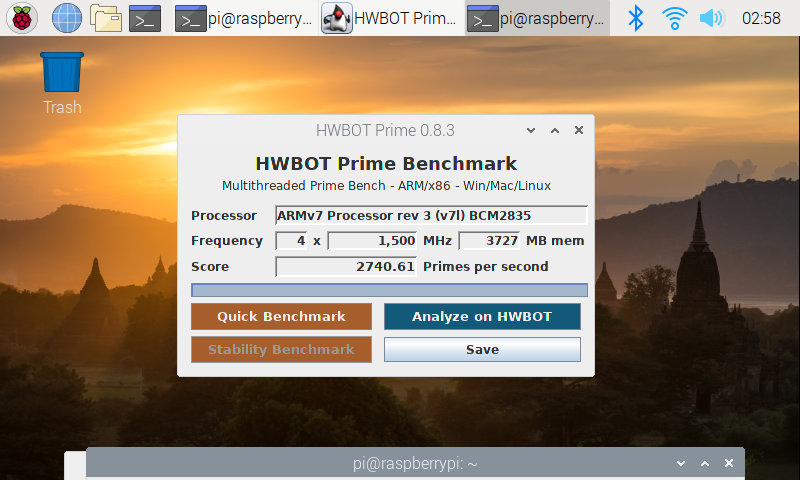
The processor was detected incorrectly, but there were no problems with the frequency and amount of RAM.
I think it will be interesting for you to know that the previous Malinka model scored only about 440 parrots in this test at standard frequencies and about 520 at extreme acceleration with liquid nitrogen and negative temperatures. Such interesting data was provided by overclockers from the team K|ngp|n in the issue of the magazine HackSpace for December 2017. The fourth version leaves these results far behind and shows an impressive increase of more than six times! What indicators should we expect from RAM?
The Sysbench test Suite is even easier to install:
Here I will not retell all possible settings and explain what the specific parameters of this utility are responsible for as always, you can find a detailed description using the command --help. I again want to compare the new and old versions of odnoplatnik:
sysbench 0.4.12: multi-threaded system evaluation benchmark
Running the test with following options:
Number of threads: 4
Doing memory operations speed test
Memory block size: 1K
Memory transfer size: 800M
Memory operations type: write
Memory scope type: global
Threads started!
Done.
Operations performed 819200 (1374234.65 ops/sec)
800.00 MB transferred (1342.03 MB/sec)
And here is an unexpected result: the third version showed a bandwidth of 2210 MB/s, and here even 1400 is not typed! The only explanation I can see is that modern RAM based on dynamic memory cannot be considered completely "random" in terms of access time: overhead is unavoidable in any case. And modern memory interfaces try to optimize more in favor of sequential reading, for working together with the processor cache. Therefore, it is difficult to make an unambiguous conclusion about performance here.
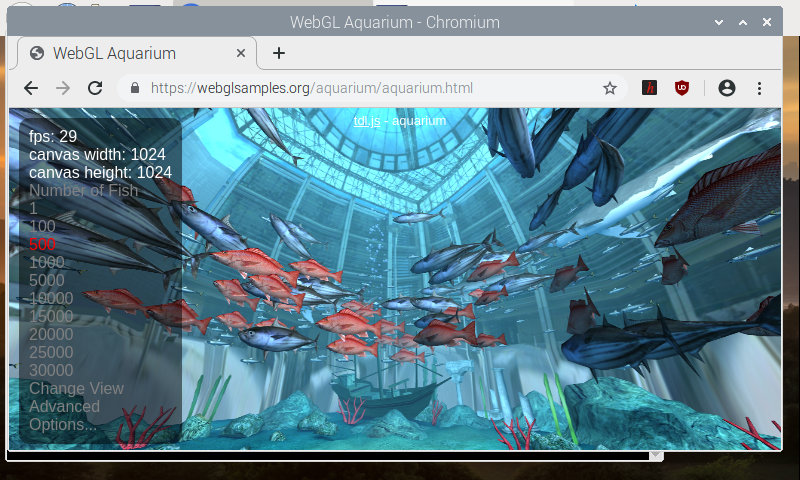
I also decided to test The videocore VI graphics subsystem on the page WebGL Aquarium. Modern tablets here can handle drawing 15 thousand fish, while maintaining the image refresh rate at 30 frames per second. The capabilities of the Raspberry Pi are much more modest in this regard, but the result of 500 fish can be considered worthy for the built-in graphics.
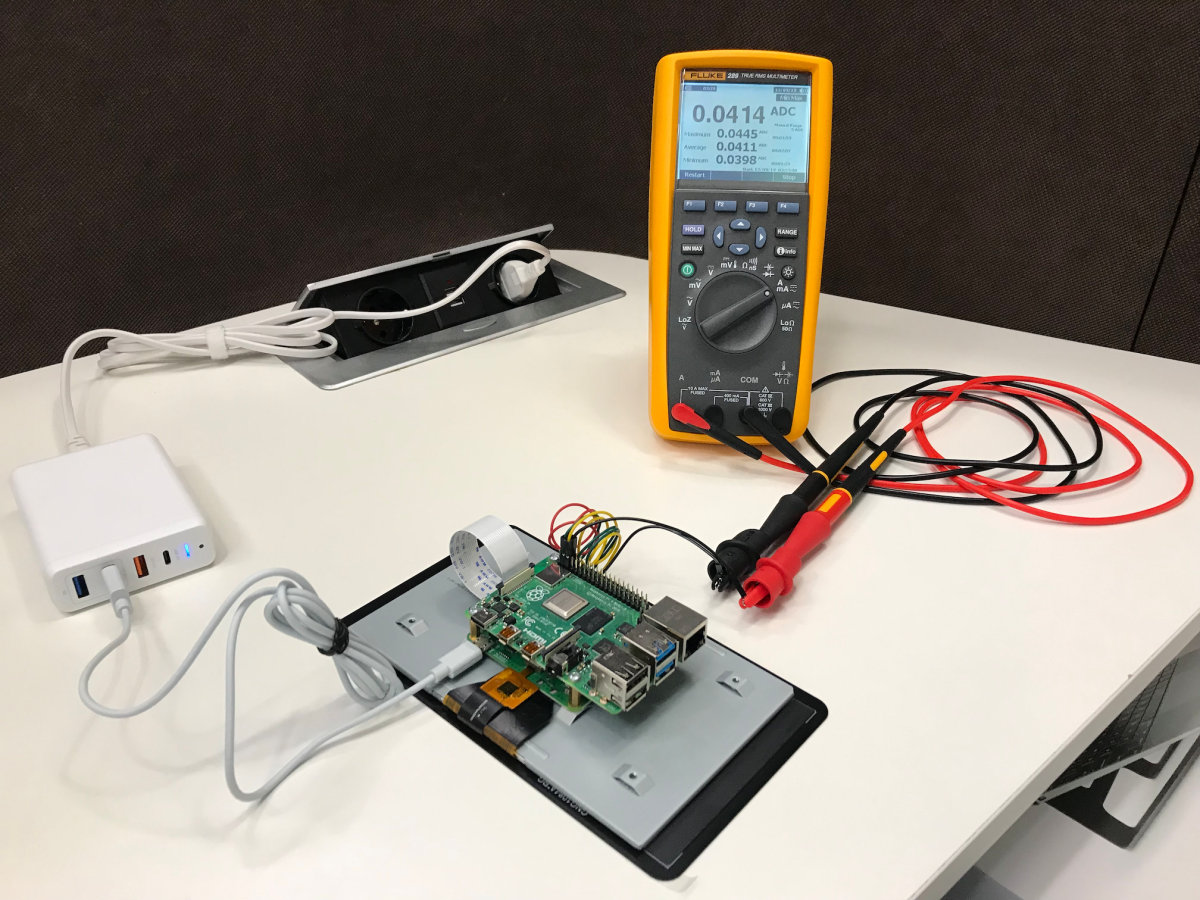
Some additional tests (including images from the thermal imager) can be found here on the page developers. Pay attention to how economical the new odnoplatnik turned out with all its advantages.
General impressions
Overall, the new Raspberry Pi was definitely a success. Perhaps this is the first model that is really comfortable to use as a replacement for an office nettop or home PC, if it is used mainly to run the browser. No, of course, you can't watch a 4K video on YouTube, but it's unlikely that anyone seriously expected this. Moreover, the Raspberry Pi is still an excellent emulator of old gaming platforms and a good basis for the media center. Not to mention all the geeks, makers and hackers. Well, it's not for me to tell you!
xakep.ru
Having received the affectionate nickname "Malinka" among the people, RPi has become a kind of ZX Spectrum for the modern era. Parallels can be drawn for a long time: both computers were born in England (and not just anywhere, but in Cambridge!), both were intended primarily for education, but they easily "outgrown" the allotted framework. Being not the most productive for their time, they attracted users with a democratic price, simplicity and, of course, support from the community.
At least the founder of the Raspberry Pi Foundation Eben Upton until he is knighted by the Queen of England, as Clive Sinclair was almost forty years ago, there is no doubt that public recognition of his services is yet to come. It is quite possible that in a couple of decades, one of the new generation of hackers and programmers will warmly remember their first raspberry microcomputer, which helped them decide on their life path. Yes, Linus Torvalds studied programming in Sinclair QL, in case you didn't know!
INFO
About sir Clive Sinclair and the development of the first microcomputers at Sinclair Research, an art and historical film was shot Micro Men movie with Martin Freeman in one of the main roles. The success of his other work the TV series "Sherlock" this picture did not get, but if the fate of the pioneers of it interests you at least a little, the film is definitely worth watching.
I think now you can see why I just couldn't pass you by Raspberry Pi 4 and I bought this single-Board card as soon as it appeared in our free sale and maximum configuration. Official deliveries to Russia, as far as I know, have not yet been made, but Resellers have made a good fuss in time and brought some "raspberries" for the most impatient enthusiasts. It's time to find out what the current update has in store for us!
Board overview
Interesting details can be found already in the configuration. The Board is not Packed in an antistatic bag and this is strange. Eben Upton mentioned that his team is trying to reduce the cost of production of the Raspberry Pi as much as possible, but this is some kind of radical cost optimization. You'd expect to see similar savings when applied to Raspberry Pi Zero for $5, but not to the flagship model for $55.
However, all these are the little things of life that you immediately forget about as soon as you read the paper instructions. You probably already know that the fourth version of odnoplatnik comes with different amounts of RAM to choose from. In the summer, the Raspberry Pi Foundation announced the appearance of three variants at once, with LPDDR4 chips with a capacity of one, two or four gigabytes. But the instructions contain a mention of another version, which, apparently, did not reach the release by as much as eight gigabytes! Wow!
There was not a word about it in the news, and we can only guess why the developers decided to abandon this model. It is quite possible that the final cost of a raspberry with such a memory chip turned out to be too high and did not fit into the philosophy of a cheap computer, which they try to adhere to in Cambridge. In addition, do not forget that the release of a new generation in several versions at once is a bold experiment, and no one in the organization itself yet knows which model will eventually be the most popular among users.
In this situation, postponing the release of the eight-Gigabyte version and evaluating the demand for its nearest equivalent with four is quite a logical step. So the probability of an even more productive Raspberry Pi remains, especially since developers will have to somehow fix the hardware compatibility problem with some power supplies (more on this below).
Further inspection of the microcomputer itself did not bring such unexpected surprises. As stated, the form factor has remained the same, but the location and set of connectors have changed slightly, which is why the single Board has lost backward compatibility with some of the previous accessories. By the way, this is the first time this has happened in the history of the Raspberry Pi, except for the original models with full-size SD cards. Was it worth it?
The first thing that catches your eye is that the RJ45 connector for Gigabit Ethernet has been swapped with a pair of USB ports, moving it closer to the PoE pins. Of course, such a change suggested itself and only made the wiring of the Board easier. By the way, now the network and USB peripherals hang on separate interfaces. Before that, they were United by a common hub, which created problems when used simultaneously.
In addition, we finally have two USB 3.0 ports, without which it would be very sad in 2019. This means that it is now possible to connect external SSDS and other modern high-speed peripherals like Webcams with 4K resolution. You can even build your own budget NAS, since a bundle of USB 3.0 and Gigabit Ethernet leads to a certain kind of madness for example, RAID on an SSD. By the way, the VIA VL805 chip responsible for USB communicates with the processor via PCI Express, and enthusiasts almost immediately found a way work with even faster NVMe drives by simply unsoldering the USB hub from the Board. Cool hardware hack!
The full-size HDMI connector was removed from the side, replacing it with a pair of Micro-HDMI 2.0. Alas, they are close to each other, and because of this, it will be inconvenient to connect adapters with thick connectors on the tails. But now it is possible to display the image on two displays at once. The manufacturer in the announcements immodestly writes that it supports "up to two displays and up to 4K@60", but in fact you have to choose: either two displays at 30 frames, or one, but with a smooth image.
Compared to the tiny connectors of video interfaces, the old-school 3.5 mm audio Jack seems huge. Surprisingly, the engineers not only decided to keep it, but also did not throw out the ability to output an analog video signal to it! So everyone can try to breathe life into old TVs and emulate retro games on an authentic screen.
But with the Mini-USB connector, the developers said goodbye, now in its place you will find USB Type-C. According to the creators, this allows you to feed the new "stone", whose appetites have grown to 3 amps under load in total, an impressive 15 Watts of consumption. How true such bold statements are, we will definitely find out a little later, but for now I'll just note that the implementation of the USB Power Delivery standard on the new Board broke compatibility with current power supplies for some users (including me). If this problem is critical for you, you should wait for the next revision of the Board, in which the developers promised to fix the flaw.
The microSD slot was left in its rightful place. If you were counting on a built-in flash drive in a new generation (like the RPi Compute Module, for example), alas and Ah - your hopes did not come true. I'm also a little disappointed, to be honest. On the Raspberry Pi 2, this connector was not the most successful design and it got loose on my Board after some time, so the system was successfully loaded from the memory card every other time.
The GPIO pins are also unchanged. On the one hand, this allowed us to maintain compatibility with existing expansion cards, which is nice. On the other hand, as before, the output RESET signal is very lacking to force a system reboot (for example, automatically using a supervisor chip). In addition, it would be great to have at least a couple of additional USB interfaces on this connector — so that it is convenient to use those peripherals that are not supposed to be reconnected too often (such interfaces can almost always be found at the bottom of regular desktop motherboards).
Most SoC: BCM2711
However, the most interesting changes occurred, of course, with the Central processor. Now this is SoC BCM2711 with four cores Cortex-A72 based on the ARMv8 architecture, which brings system performance to a qualitatively different level. Previous models were based on cores from Cortex-A7 (Raspberry Pi 2) to Cortex-A53 (Raspberry Pi 3+), so with this update, developers jumped several steps at once.
First of all, this was facilitated by the transition to the 28 nm process technology. Chips on all previous versions of the single Board were manufactured using 40 nm technology, and with the release of BCM2873 on RPi 3+, engineers ran into limitations on the crystal area. Higher-performance cores required more transistors, which simply had nowhere to be placed. As you can see, while Intel and AMD unsuccessfully storm the threshold of 10 nm in the development of x86 processors, other-more modest-companies feel quite comfortable on already proven and long-tested technical processes.
At the moment, the documentation for the BCM2711 chip is not publicly available, but you can partially satisfy your curiosity by reading using the manual on Cortex-A72.
As for the peripherals, the new system-on-a-chip has received a three-dimensional graphics accelerator Videocore VI (500 MHz, 2160p). There isn't much information on the GPU right now, either, and we can only hope that after some time Broadcom will support the community and post an appropriate reference, as happened with Videocore IV on the second anniversary of the Raspberry Pi project. Still, Eben Upton has repeatedly stated that their ultimate goal is to make the single-board platform as open as possible over time.
Interesting features
I'll go through the most important points that I noticed when working with RPi 4.
USB PD issue
Just above, I already noticed that the new microcomputer is picky in terms of power supply and will not work on every charge. So, my calculation to use a power supply unit with USB-C from the MacBook Pro together with the raspberry was not justified: they simply could not agree. But I've been waiting for a similar moment since 2017 - otherwise, why even start this whole painful transition to a unified connector?!
Let's try to understand what the problem is here. Some users on the forums it was suggested that Apple laptop power supplies do not support charging with a voltage of 5 V. But this is not the case: a sticker on one of the charging sides confirms that the device implements the USB Power Delivery standard with 5/12/20 volt levels. You can easily verify this by simply connecting a regular smartphone to the power supply via a suitable cable.
In fact, the reason lies in the raspberry Pi scheme and partly in the method of electronic identification (eMark) of cables from some manufacturers (Apple, Dell, and others). I suggest you make sure of this together. To do this, you will have to find the documentation (PDF) on the site and take a closer look at the Pinout of the USB-C connector.
Here is the resistor R79 connects to GND not one, but both contacts СС1 and CC2. Besides, R1 goes to the Board's power controller, although it should also be connected to ground. The correct scheme is shown in the figure below.
You can read more about the issue here on the page Tyler Ward.
Hidden JTAG
The curious surprises don't end there. After turning the raspberry for a couple of minutes in your hands, you will probably find that on the reverse side, under the USB connectors, another mysterious interface is separated without any soldered connector. It's labeled as J5 on the Board, but that alone doesn't explain much.
Let's try to guess its origin based on the number of contacts. Obviously, this is not an ordinary UART or USB — there are as many as seven conductors here. Apparently, it is assumed that the average user will never need this connector. Hmm, what can a developer be so special about?
What if this is an interface for debugging? Of course! Several searches in the search engine shed light on the purpose of the mysterious J5 connector: this is the JTAG of the Videocore graphics accelerator. It turns out that someone on the Internet has already asked this question, you can read the details. in the note Andy Kirby.
Downloading from EEPROM
Another notable feature of the new Raspberry Pi is booting from a chip soldered to the Board SPI EEPROM. If you remember, earlier a single-payer needed a 'bootcode' to start.bin ' in the boot partition of the memory card. In the new Raspbian distribution, this file remains in its place, but only to support previous versions of the computer.
The developers themselves indicate several reasons for this decision. First, the complexity of the interfaces on which memory and peripherals are connected has increased now these are LPDDR4 and PCI Express, and they require much more code for initialization. Previously, it was possible to compactly place everything in the ROM area on the SoC itself, but now there was not enough space for them.
Secondly, the team has big plans to add new features: for example, in the near future they promise to implement booting from USB and over Ethernet. It's sad that this feature is not available to us since the start of sales of the device, but at least it's clear what exactly to expect in the firmware updates.
Finally, do not forget that this method makes it easier to fix errors (or add new ones!). By the way, with similar goals, you can pick up the Downloader and its beta version yourself:
Code:
$ sudo apt install rpi-eepromTests
Today, single-board cards are mass-produced in a wide variety of form factors, and only large companies in this market can easily be counted with a dozen. Of course, the Raspberry Pi Foundation stands out favorably against their background with its popularity, but healthy competition allows customers to choose the best solution for their tasks. And what helps you make a decision in the first place? Of course, the tests!
WARNING
While getting acquainted with the Raspberry Pi 4, an interesting feature of the Wi-Fi module turned out: if you set the RU region in the microcomputer settings, then an attempt to connect to an access point with the 5 GHz frequency range (802.11 ac) will fail. It sounds incredible, but I've encountered just such a problem, and that's all reading forums helped clarify the reason.
Personally, I am most interested in the new microcomputer memory and processor, so I suggest you start with them. CPU performance can be measured using a benchmark HWBot Prime, and we will evaluate the RAM characteristics based on the results of the utility Sysbench. But first of all, let's configure the system for maximum performance with the command:
Code:
$ echo "performance" | sudo tee /sys/devices/system/cpu/cpu0/cpufreq/scaling_governorNow let's install the benchmark itself:
Code:
$ wget http://downloads.hwbot.org/hwbotprime.jarIt requires OpenJDK which you may not have in your system, so we'll take it as well:
Code:
$ apt-get install openjdk-8-jreAfter that, we run the test and observe the result.
The processor was detected incorrectly, but there were no problems with the frequency and amount of RAM.
I think it will be interesting for you to know that the previous Malinka model scored only about 440 parrots in this test at standard frequencies and about 520 at extreme acceleration with liquid nitrogen and negative temperatures. Such interesting data was provided by overclockers from the team K|ngp|n in the issue of the magazine HackSpace for December 2017. The fourth version leaves these results far behind and shows an impressive increase of more than six times! What indicators should we expect from RAM?
The Sysbench test Suite is even easier to install:
Code:
$ apt-get install sysbenchHere I will not retell all possible settings and explain what the specific parameters of this utility are responsible for as always, you can find a detailed description using the command --help. I again want to compare the new and old versions of odnoplatnik:
Code:
$ sysbench —test=memory —num-threads=4 —memory-access-mode=rnd --memory-total-size=800M runsysbench 0.4.12: multi-threaded system evaluation benchmark
Running the test with following options:
Number of threads: 4
Doing memory operations speed test
Memory block size: 1K
Memory transfer size: 800M
Memory operations type: write
Memory scope type: global
Threads started!
Done.
Operations performed 819200 (1374234.65 ops/sec)
800.00 MB transferred (1342.03 MB/sec)
And here is an unexpected result: the third version showed a bandwidth of 2210 MB/s, and here even 1400 is not typed! The only explanation I can see is that modern RAM based on dynamic memory cannot be considered completely "random" in terms of access time: overhead is unavoidable in any case. And modern memory interfaces try to optimize more in favor of sequential reading, for working together with the processor cache. Therefore, it is difficult to make an unambiguous conclusion about performance here.
I also decided to test The videocore VI graphics subsystem on the page WebGL Aquarium. Modern tablets here can handle drawing 15 thousand fish, while maintaining the image refresh rate at 30 frames per second. The capabilities of the Raspberry Pi are much more modest in this regard, but the result of 500 fish can be considered worthy for the built-in graphics.
Some additional tests (including images from the thermal imager) can be found here on the page developers. Pay attention to how economical the new odnoplatnik turned out with all its advantages.
General impressions
Overall, the new Raspberry Pi was definitely a success. Perhaps this is the first model that is really comfortable to use as a replacement for an office nettop or home PC, if it is used mainly to run the browser. No, of course, you can't watch a 4K video on YouTube, but it's unlikely that anyone seriously expected this. Moreover, the Raspberry Pi is still an excellent emulator of old gaming platforms and a good basis for the media center. Not to mention all the geeks, makers and hackers. Well, it's not for me to tell you!
xakep.ru


