

Brother
Professional
- Messages
- 2,590
- Reaction score
- 526
- Points
- 113

In recent years, a password alone has become insufficient to protect important accounts from unauthorized access. Most large companies (Google, Apple, Amazon, Microsoft, Dropbox, Facebook, and many others) have first introduced optional and then highly recommended second factor authentication. As long as the second factor is in your hands, everything works well. But what will happen if you remember the password, but there is no access to the second factor?
Let's try to figure out what happens to your Apple and Google accounts if access to the second factor is lost.
How can you lose the second factor?
How can you ever lose the second factor of authentication, you ask? Easy: on a trip (especially abroad) your phone was stolen (forgot, lost - not the point). Quite by accident, a SIM card with a trusted number was installed in a stolen (forgotten, lost) phone. You can block a stolen device without it, but you will not be able to log into your account to activate a smartphone purchased to replace the lost one: your “home” SIM card will not be restored to you abroad.In the case of Apple, things are even more interesting. In addition to trusted phone numbers, only Apple devices can act as the second authentication factor for Apple. No spare codes, no application that would generate one-time keys, is provided. So, if suddenly you are going to sell or exchange the only Apple device you or your child has, make sure that the current phone number is specified in the account settings. Otherwise, no one will help you: you will no longer be able to log into your account on the newly purchased device.
The most interesting thing happens when access to the second factor of authentication is lost by a child under the age of thirteen, whose device is included in Family Sharing and is controlled using the Screen Time feature. It would seem that you are a parent with parental controls active. Log into your account and do whatever you want. It would be so if the child simply forgot the password; however, according to Apple, a child can forget a password, but never lose or break the second factor of authentication. You will have to solve the problem in a completely adult way. Looking ahead, I will say: in some cases, she will not have a solution at all.
Apple and two-factor authentication
I suppose today it is no longer necessary to explain what two-factor authentication is and why it is needed. In the case of Apple, however, additional clarification is needed. Apple developers require the use of two-factor authentication not only for its main function - to protect the account from unauthorized access, but also to access the following features:- Sync passwords to iCloud cloud (iCloud Keychain cloud). Once you get used to it, this opportunity becomes truly irreplaceable. Interestingly, a couple of years ago, it was possible to use password synchronization in the cloud without two-factor authentication (and, for example, Google still allows this to be done).
- Quickly reset or change a forgotten Apple ID password. A rather controversial possibility: anyone who gets your iPhone in their hands and who finds out your lock code can also change the password for your Apple ID account (and at the same time untie the device from iCloud).
- Synchronization of messages with the iCloud cloud (SMS and iMessage). Pretty convenient too; earlier messages were saved only in backups.
- Synchronization of data from the Health application. It is logical that the company is trying to protect this category of data to the maximum.
- Remote operation of Screen Time. In order to control your child's screen time, you will have to enable 2FA on both your account and the child's account. Another controversial decision given the ease with which children lose and break devices.
Sign in to your Apple Account
- Login and password: no, the second factor is required (except for the Find My iPhone service).
- Using only the second factor: yes, you can. Just reset your password and enjoy the service.
Factory Reset iPhone and Disable Find My iPhone
- Login and password: yes, you can reset and disable the iCloud binding.
- Using only the second factor: also no problem. We just change the password and then turn off iCloud.
Set up a new device and restore data from a cloud backup
- Login and password: no, a second factor is required.
- Using only the second factor: yes, you can. Just reset your password and enjoy the service.
If you forget your password
First, let's figure out what will happen if you forgot the password for the account in which the protection is activated by an additional factor. If the second, additional factor is in your hands, there will be nothing special: it turns out that the password is actually not needed at all and only the second authentication factor is enough to successfully log in to your account. If you have an additional factor, you can easily reset or simply change your Apple ID password to a new one. This is how it works.If iPhone or iPad is set up to work with your account
If you have an iPhone or iPad in your hands that is configured to work with your account (and 2FA protection is activated), then you can simply change the password for your account. Here's Apple 's instruction:- Make sure your device is running iOS 10 or later.
- Open the settings.
- Click on “[your name] → Password and security → Change password” and follow the instructions on the screen to change your password. For iOS 10.2 and earlier, tap “iCloud → [your name] → Password and security → Change password” and follow the onscreen instructions.
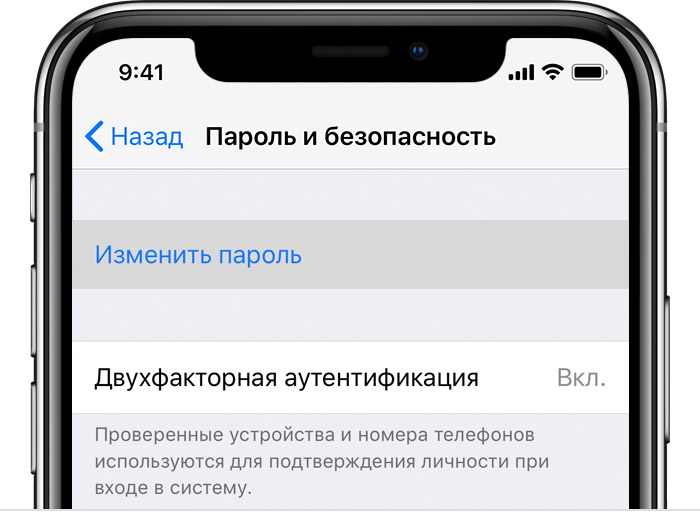
Please note that the original Apple ID password is not required for this.
If it is possible to reset the password through the website
You can reset your password through iforgot.apple.com. Instructions will be sent to all trusted devices at the same time.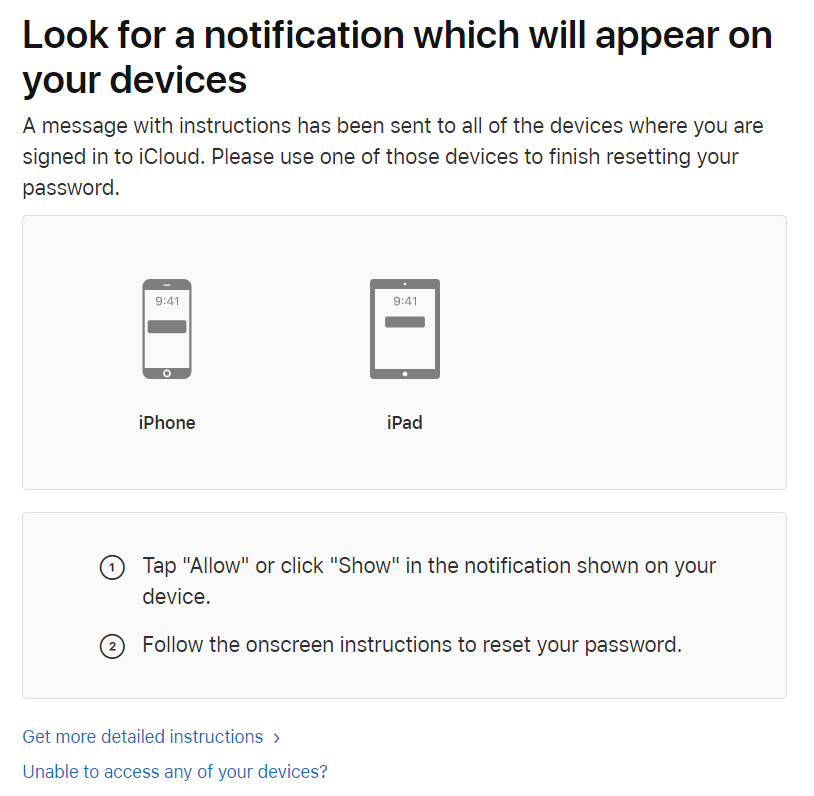
If the previous options are not available
If you don't have a trusted device on hand, you can still reset the password using one of the many methods. The key point here is that the account must use two-factor authentication, and the second factor (like a SIM card with a trusted phone number) must be available.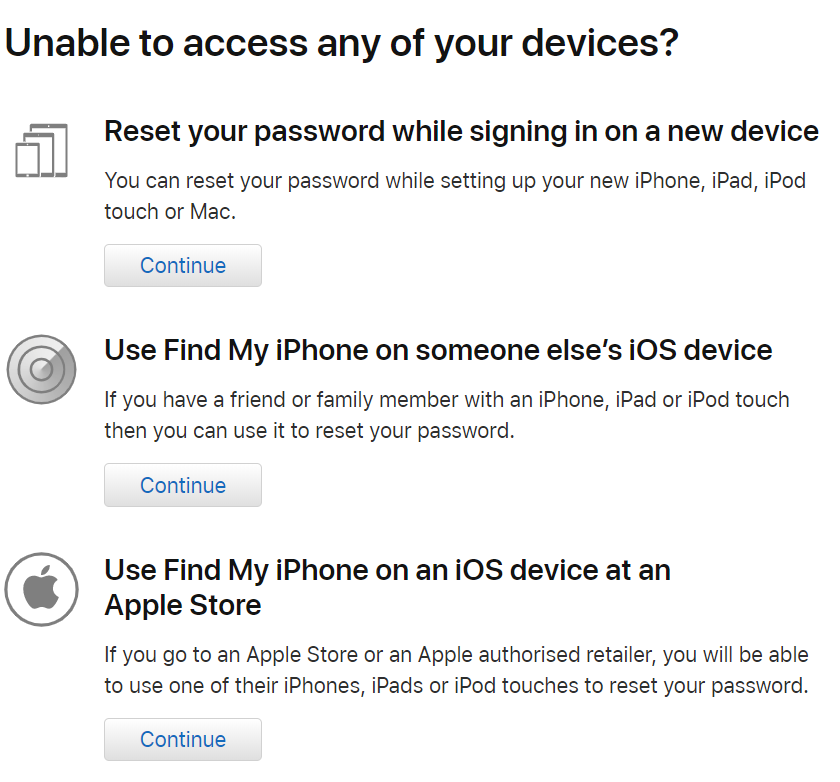
If the password is stolen
If your password is stolen, your data is relatively safe. The only Apple service that an attacker with your password can use is Find My iPhone. Through this service, you can track the location of your devices, block them or delete data from them. But an attacker will not be able to gain access to your data - the same photos or passwords saved in the cloud. You can always restore your discarded devices from a backup, local or cloud.What is considered the second factor of authentication
In the Apple ecosystem, the second factor might be:- Your iPhone, iPad, iPod Touch, or macOS computer using your Apple ID.
- Trusted phone number.
Considerations for authenticating with another Apple device
- Only works if you can unlock your device with Touch ID, Face ID or Passcode.
- You can generate an offline verification code through the Apple ID → Password & Security settings. Interestingly, the codes generated at the same time on different devices will be different (but this is not the case for Google: the offline Authenticator application will generate the same codes at any given time, regardless of which device is running on).
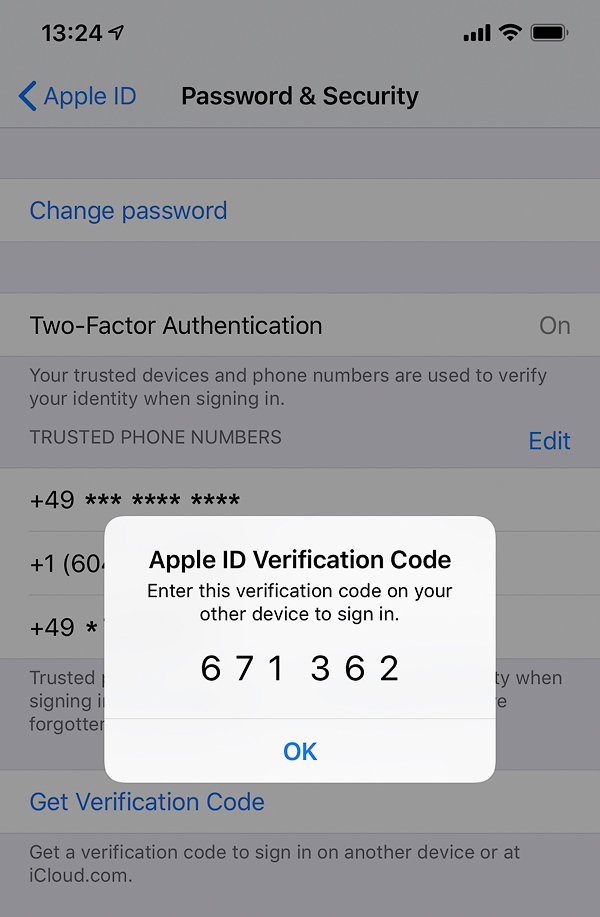
- If the device is connected to the Internet, the code will be sent to all devices.
- Each device will receive its own unique code.
- IOS 11.3 introduces the ability to pass two-factor authentication even without entering a one-time code. In some (not officially specified) cases, the iPhone automatically verifies the trusted phone number in the background. This is probably technically implemented by the delivery of a hidden SMS with a token (in a similar way, Xiaomi implements two-factor authentication to protect Mi Account).
Features of Authentication Using a Trusted Phone Number
- There can be several trusted phone numbers, and any of them can be used against you (to intercept control of your account, change your Apple ID password and subsequent manipulations).
- Having at least one trusted phone number is a prerequisite for enabling 2FA.
- The verification code comes via SMS or voice call.
What happens if you only have one Apple device and only one trusted phone number and you lose both?
If you know the password but have lost the Secondary Factor of Authentication
As you remember, a forgotten password in the presence of a secondary authentication factor is a solvable issue, and resolved in a few seconds. But for the loss of all copies of the second factor of authentication, Apple will punish: despite the fact that you know the password, you will not get to your data without a long (up to two weeks) procedure for restoring access to your account ... And it's not a fact that they will restore access to you: there is a possibility that you will have to say goodbye to your account and all the data accumulated there.As we have already found out, if your Apple ID password is stolen, then the maximum that an attacker can do is to block the devices associated with your account and erase the data from them. He will not be able to change the password for the account; will not be able to access the data.
If the second factor of authentication is stolen from you, you are in trouble. Alternatively, an attacker can get a new SIM card for you with a trusted number using a fake power of attorney - this method of fraud is gaining momentum, and sometimes dishonest employees of cellular operators are involved in such schemes.
So, if the second factor is stolen, an attacker can proceed as follows.
- In the first step, an attacker will try to change the password for your Apple ID account. As you remember, this is easy to do. Your remaining devices will receive a notification about an attempt to log into your account; as a rule, the fraudster will change the password before you have time to react. After this, events will develop at a high speed: the fraudsters' scheme has been worked out, and it does not immediately become clear to an ordinary user that his account has been hacked.
- After the password for the account is changed, the attacker will try to untie the device from iCloud as quickly as possible, and then either immediately reset the device (if its purpose is resale), or gain access to all your information.
An attacker will have access to all information from the list below:
- Photos from iCloud Cloud if iCloud Photo Library is enabled.
- Synchronized data. This includes contacts, calendars, notes, reminders, a list of phone calls (including voice calls via apps like Skype or Telegram, by the way), Safari browser history, bookmarks, open tabs, and more.
- Health app data if you have had at least one iOS 11.x device.
- After restoring a backup from iCloud to a fresh phone (by the way, photos can also be saved in it if the cloud storage of photos is disabled) - the data of many applications installed on your devices. It should be noted here that a number of applications limit the amount of data stored in the backup.
- If you use an email address on icloud.com, then access to your correspondence.
- ICloud Drive files.
- Books and documents from the Books application.
- Data from many apps that use iCloud Drive to sync or store information.
Information from the following list is additionally encrypted with a key that can only be obtained by a device from the "circle of trust". You can enter the "circle of trust" only by entering the lock code for one of your iOS devices (or the system password for your Mac). After ten incorrect attempts to enter this code, the contents of the cloud keychain are destroyed. If the intruder does not know the lock code, he will not get access to the following data:
- Cloud Keychain iCloud Keychain. All your passwords can be stored here - both those that were saved in the Safari browser, and those that you entered in applications. Fortunately, the password store is securely encrypted; it is impossible to extract (or rather, decrypt) this information from the cloud without knowing the lock code for one of your devices.
- Health app data saved by iOS 12 devices. This data is also encrypted with a key from the iCloud Keychain.
- Your SMS and iMessage messages if you have turned on the cloud message sync mode. But if the synchronization mode was not enabled, then the messages can be retrieved from the backup copy.
- Data from a number of applications that are not backed up to the cloud. This includes, for example, many instant messengers (Skype, Telegram), email clients (Outlook, Gmail), authenticator applications, banking applications.
How to restore access to Apple ID
In what cases is the user most likely to lose both copies of the second factor of authentication - both the phone and the trusted phone number? Of course, when traveling and traveling. It would seem that, given the frequency of these regularly recurring incidents, Apple should have a clear mechanism to restore access to the account as quickly as possible. Well, for example, a user could come to the Apple Store and identify themselves with at least a passport in order to be able to activate a new device. However, this approach does not work. Apple does not consider either the user himself or his passport to be the second factor of authentication, which means that such a suspicious person should not be allowed to enter a protected account.Accordingly, you will first have to restore the SIM card with a trusted phone number (for which, as a rule, you need to return to the country in which the SIM card was issued - except for cases when an eSIM was used) and receive an SMS on this SIM card with a verification code. Only then will you be able to log into your own account.
What if you need access here and now? The only thing Apple can help you with is the automated procedure for recovering access to your Apple ID, and "for security reasons, the recovery process may take several days or more." In addition, even if you enter the correct data, success is not at all guaranteed.
Generally speaking, it is hard to believe that things can be this way. In the end, a person can lose anything (and many of us do it regularly). In most cases (loss of SIM-cards, bank and credit cards), the lost can be restored easily and easily, even if not always for free. Considering how easy it is to recover a forgotten Apple ID password with the help of the second factor, we expected that the second factor could also be recovered by means of a password (and, possibly, an identification document). Alas, it turned out that this is not the case.
An important takeaway: In the Apple ecosystem, the second factor of authentication is suddenly becoming the primary authorization tool for the user. The password for the account fades into the background and becomes completely optional.
Two-Factor Authentication, Kids Accounts and Screen Time
Family Sharing is a great way to share apps and other content purchased from the App Store. In one "family" Apple allows up to six members. At the same time, Apple officially recommends using separate, unique Apple IDs for each family member, including children. To control the use of devices by children in the latest versions of iOS, the "Screen Time" mode is available. In this mode, you can both monitor the use of the device by a child and set up restrictions.It is convenient to control the screen time remotely via the cloud. However, in order to do this, two-factor authentication must be enabled on both parent and child accounts. Thus, even child accounts, according to Apple, should use two-factor authentication (looking ahead: no, just a parental password is not enough).
Further - more interesting. If the child is under the age of thirteen, then you cannot simply remove his account from family sharing: according to Apple, doing this is equivalent to throwing the unfortunate child out into the street. Moreover, if your group has at least one account whose member is less than thirteen years old, you cannot even leave family access by disbanding the group . As a result, if the child loses the second factor of authentication (for example, if you registered a SIM card as a trusted number, which you then stopped using), not only will you lose access to the child's account, but you will not be able to remove it from family access.
To be honest, I found it hard to believe that such an illogical system was possible. I artificially created the situation described above and called Apple tech support. After talking with a technical support specialist, and then a second-level specialist, I had a strong feeling that I was unobtrusively recommended to create a "fake" Apple ID, into which I can transfer the unnecessary child . Why "phony"? The likelihood that technical support workers would seriously recommend having a new wife, who could "shove" the child, I estimate as extremely low.
My overall conclusion is that the second factor of authentication in the Apple ecosystem is currently playing too much of a role.
Think Different: Google Two-Factor Authentication
With what Apple did out of two-factor authentication, Google's system seems like a breath of fresh air. Google uses two-factor authentication solely for its intended purpose: as an additional security measure and for nothing else. Google accounts without two-factor authentication have exactly the same capabilities as with it.Google is extremely liberal about what exactly can act as an additional factor. Here's a list:
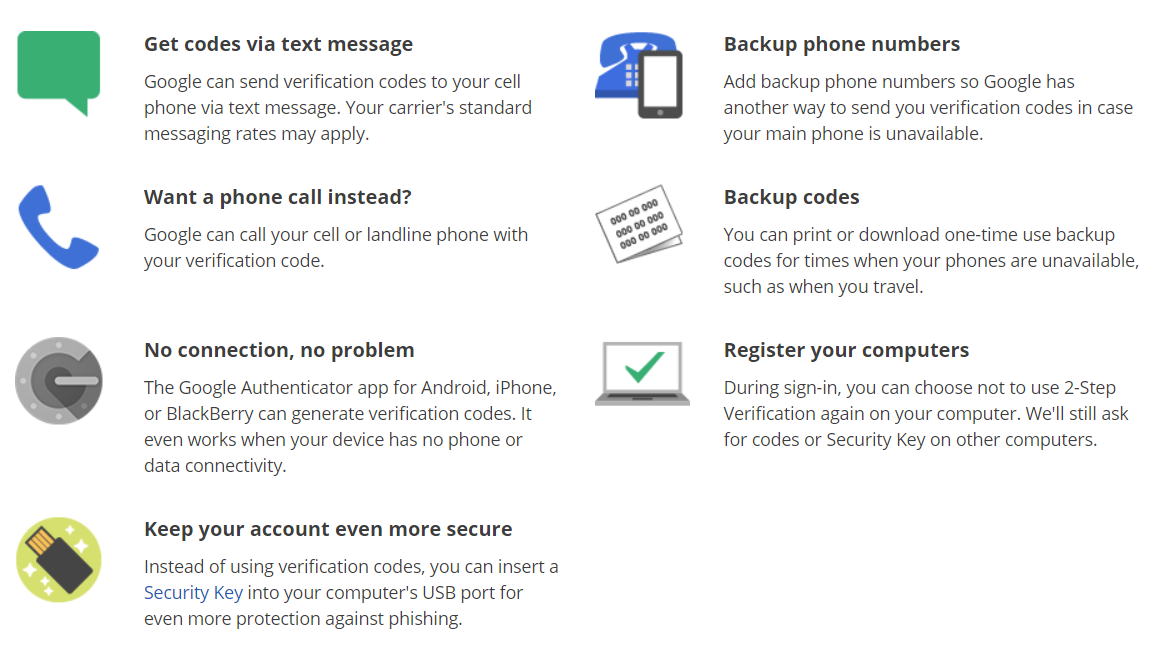
Your Android phone or tablet with your account added
- Only if you can unlock it (with biometrics, password, etc.)
- Push notifications are easy enough to confirm without any codes
- Authentication is carried out through the server (or rather, through GCM services)
Trusted phone number
- Unlike Apple, Google doesn't consider phone authentication secure. Accordingly, the presence of at least one trusted phone number is not a requirement.
- Multiple trusted numbers can be registered
Authenticator app
- Works offline
- TOTP standard protocol
- There are many applications of this class for any, even the most exotic platforms. They are compatible with each other
- Apps are released by Google, Microsoft, Xiaomi and many independent developers. Again, they all serve their purpose, including for Google accounts.
- All instances of authenticator apps are initialized with the same QR code. Accordingly, the codes generated by all instances of the TOTP protocol will be the same at every moment of time.
- The same QR code can be used to initialize multiple instances of authenticators across different platforms
- Revocation of one compromised authenticator in Google Account settings automatically revokes all other instances of authenticators initialized with the same QR code
Other interesting options
- One-time code list: can be printed and saved in a safe place
- Hardware keys (FIDO U2F or built into smartphone)
- The browser (meaning Chrome, but others work in this capacity) from which you logged into your Google account, if you did not mark during login that you are logging in from a public computer
If you lost the second factor for logging into Google Account
Google understands that access to 2FA can be lost in the same way as a password. The company wrote a detailed article on this topic " Problems when using two-step authentication", Which begins with the item" My phone was lost or stolen. "In general, we will not be told anything particularly interesting: most of the proposals boil down to taking advantage of one of the many additional authentication factors that you might still have at your disposal. Perhaps, only the option to enter the Google Account settings from the browser on the computer in which you once logged into your Google account is of interest, and from there temporarily disable two-factor authentication or, for example, generate a dozen fresh backup codes. of authentication, you can take care in advance to get additional ones.If none of the additional factors is available to you, then the only remaining option is the automated procedure for restoring access to your account. We have tested this feature many times and, as with Apple, have come to the conclusion that its successful use is a matter of luck and not anything else. Sometimes we were able to get access to the account, but quite often our attempts ended with Google simply blocking the account and demanding to change the password. By the way, an attempt to restore access to your account will fail with a very high probability if you try to do this while on a trip abroad. But from home, with your own IP, you have a chance.
Two-factor authentication, child accounts and Family Link
Like Apple, Google recommends creating separate accounts for children, including those under the age of thirteen. Just like in the Apple ecosystem, you can add your child to the family group, which will allow the child to use the apps you purchased - however, only those that you paid after July 2, 2016. (For example, the Nova launcher I bought from time immemorial is not available in my family group.)If a child uses a tablet or phone with Android, then his account can be managed using the Google Family Link application (by the way, the Family Link functionality is also available on the iOS platform through the application of the same name). Google Family Link is a lot like Apple's Screen Time and performs similar functions. However, Google does not have a number of restrictions (for example, a child's account can be freely added and removed regardless of age), but there are others (for example, when Family Link is activated, the YouTube application automatically becomes unavailable on a child's device under the age of thirteen).
We are primarily interested in Family Link in how two-factor authentication is processed in it - and it is. In order to set up a child's device, you will need to enter both the child's account password and the password of one of the parents: here it is, the second authentication factor.
Children may forget their password (they do not have to use this password, so this happens all the time). Accordingly, the procedure for changing a forgotten children's password has been simplified to the limit: a parent only needs to open the Family Link application and tap on the "change password" command right on the main screen. After that, the password for the child's account can be changed. The whole process takes seconds.
What happens if a child loses the device? You simply set up a new Android smartphone or tablet using the child's account password (current or freshly set) and - as a second factor - the password from your own Google account. As you can see, there is no drama; there is simply no way to lose access to your account.
By the way, an interesting point. When a child turns thirteen, he can become independent and get out of the control of Family Link. After that, he will be able to configure his own two-factor authentication methods.
Conclusion
Both Apple and Google ecosystems provide the ability to restore access to accounts. When using two-factor authentication, access recovery mechanisms will be very different for a situation when you forgot your password (but you have access to the second authentication factor), and a situation when you know the password, but you do not have access to the second authentication factor.In the Apple ecosystem, so many services are tied to the second factor of two-factor authentication that its value and importance is many times greater than the value of the actual password from the account. As a result, restoring access to an account if the second factor is lost is many times more difficult and immeasurably longer than restoring access to accounts with a forgotten password.
For Google, both authentication factors are roughly equivalent, but the mechanisms for restoring access will also be different. For example, if you are logged into your Google account using the Chrome browser on a computer, then anyone who opens a browser window on the same computer will have the option to change or disable two-factor authentication or generate a batch of one-time codes. However, such a user will not be able to change the password for a Google account: to change the password, you will need to enter the old one or go through the procedure for restoring access to the account.
But in the case of Apple, the Apple ID password can be changed without entering the old one: all you need to do is use one of the trusted devices or the iForgot service, having received a one-time code to a trusted phone number. You will most likely not be able to disable two-factor authentication in the Apple ecosystem (although such a possibility exists, it is not advertised, and the disconnection procedure itself is extremely lengthy). You can change the two-factor authentication settings (for example, add another trusted phone number) without a password, but one of the additional factors already available must be available.
(c) xakep.ru


